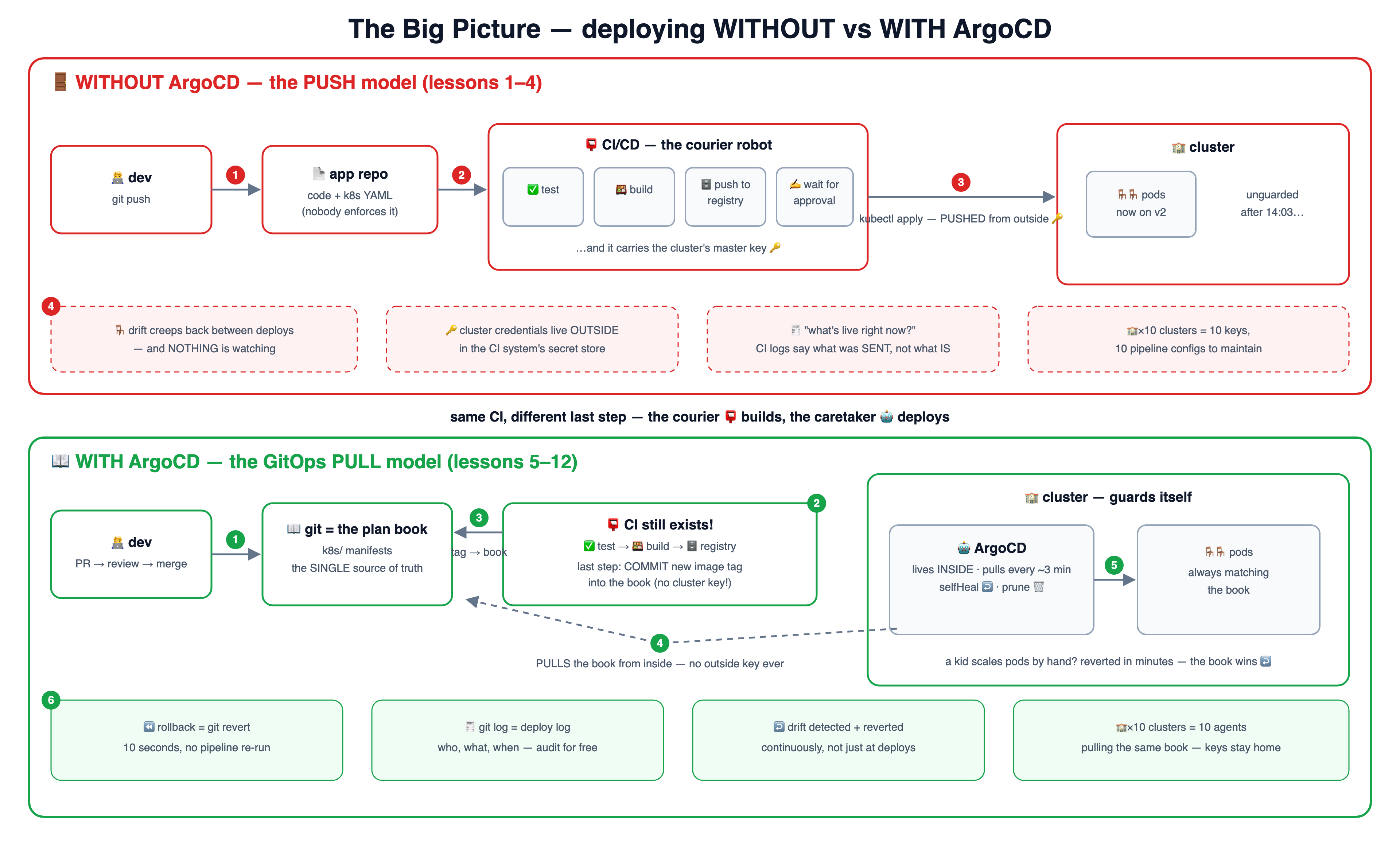
🗺️ The big picture — one diagram, both worlds
The whole course on one canvas: the PUSH world (red, lessons 1–4) with its four gaps,
and the PULL world (green, lessons 5–12) with its six wins. Click it for the
4K version — great as a wallpaper-sized reference.
1 🎒 Deploy by hand — you ARE the deploy systemkubectl apply from your laptop works… and quietly makes you the single point of failure.
🧑💻 Your laptop
YAML files + kubeconfig 🔑
🏫 Cluster
🪑🪑 hello-school pods
1 kubectl apply -f k8s/
2 works! 🎉 …today
📅 one week later
❓ which version is live?
❓ who changed it?
❓ teammate deploys too?
😱 only your memory knows
3
2 🪑 Drift — when reality stops matching the filesEvery hand-edit that never lands back in git widens a silent, dangerous gap.
📄 YAML in git says
replicas: 2
image: v1
memory limit: 64Mi
🏫 Cluster actually runs
replicas: 5 (Friday panic)
image: v2-hotfix-final-REAL
limit: 512Mi (kubectl edit)
≠
1 hotfix by hand, "just this once"
2 …and nobody writes it back to git
3 the gap = DRIFT: next "clean" deploy from git silently undoes the hotfix 💥
3 📮 CI/CD push — the courier robot deploys for youEvery push is tested, built and delivered — the human is out of the loop (mostly).
🧑💻 dev
git push
📮 CI/CD — the courier robot
✅ test
🍱 build
🗄️ registry
holds the cluster's master key 🔑
🏫 Cluster
kubectl apply, from outside
1 2 same steps every time — no "oops, forgot the tests"
3 PUSH deploy
4 🚪 Limits of push — the courier delivers and LEAVESA push pipeline deploys moments; nobody guards the state in between.
📮 pipeline run
deploys at 14:03… then exits
🏫 Cluster at 14:04+
unguarded until next push
1 🪑 drift creeps back in —
who would even notice?
2 🔑 cluster keys live OUTSIDE,
in the CI system
3 🏫🏫🏫 10 clusters =
10 keys + 10 pipeline configs
4 the fix isn't a better courier — it's a guard who LIVES in the school → Part 2
5 📖 The GitOps idea — reality must match the bookDeclare the desired state in git; an agent inside the cluster converges reality toward it, forever.
📖 git repo
DESIRED state — the book
k8s/ manifests, reviewed PRs
🏫 cluster
ACTUAL state — the rooms
pods, services, configs
🔄 agent
compare → converge
1 reads the book
2 looks at the rooms
3 fixes any difference
4 repeat every ~3 minutes, forever — same reconcile loop as lesson 03 of the k8s course, one level up
6 🤖 Install ArgoCD — the robot moves into the schoolOne kubectl apply installs the whole robot; the UI is your window into its head.
🧑💻 you
one kubectl apply
🏫 your cluster
🚪 namespace: argocd — the robot's room
🖥️ api-server
+ the web UI
📖 repo-server
clones git repos
🔄 app-controller
the reconcile loop
1 install manifest
2 port-forward the UI → https://localhost:8080 · login admin + initial secret · 3: the robot waits for its first plan page
7 📄 The first Application — one page of the plan bookAn Application says: THIS repo, THIS folder, THIS destination. The robot does the rest.
📄 Application
repoURL: learn-argocd-school
path: k8s/
destination: gitops-school
syncPolicy: automated
🤖 ArgoCD
clones the repo,
renders the manifests
📖 git: k8s/ folder
deployment + service + ns
🚪 gitops-school
🪑🪑 hello-school pods live!
1 kubectl apply -f argocd/
2 3 creates everything
from now on you never kubectl-apply the app again — you edit the repo instead
8 📏 Sync policies — how strictly the robot follows the bookManual = it asks first. Automated = it acts. Prune and selfHeal turn the strictness up.
📖 change lands in git
app becomes OutOfSync 🟡
✋ manual sync
robot ASKS — you click Sync
⚡ automated sync
robot ACTS on its own
1 2 🗑️ prune: true
deleted in git → deleted live
↩️ selfHeal: true
hand-edits get reverted
3 4 start manual while learning → automated + prune + selfHeal in production (the strict-but-fair caretaker)
9 🪑↩️ Self-heal — the chairs go back where the book saysHand-made drift survives seconds, not months. Change the book, not the room.
😈 you, by hand
kubectl scale --replicas=5
🏫 cluster: 5 pods
but the book 📖 says 2!
status: OutOfSync + drift
🤖 ArgoCD self-heal
re-applies the book →
back to 2 pods ✅
1 2 noticed in seconds
3 the book wins — every time
4 want 5 replicas for real? edit the BOOK: change git, PR, merge → robot scales up happily
10 ⏪ Rollback — flip the book to yesterday's pageIn GitOps, git history IS deploy history — so undoing a commit undoes the deploy.
commit A
image: v1 ✅
commit B
image: v2 💥 bad!
commit C = revert B
image: v1 again ✅
1 bad version ships (via git, at least!)
2 git revert — 10 seconds
🤖 ArgoCD syncs C
cluster back on v1
3 🧾 git log = deploy log:
who, what, when — audit free
4
11 📚 Helm, Kustomize & environments — one recipe, many classroomsTemplates + per-environment values; one Application per room, and a master page listing them all.
📚 one recipe
Helm chart / Kustomize base
replicas: ___ image: ___
📝 values-dev.yaml
replicas: 1
📝 values-staging.yaml
replicas: 2
📝 values-prod.yaml
replicas: 5 + HPA
1 🚪 dev room
🚪 staging room
🚪 prod room
2 one Application each
📖 app of
apps
3 one page lists
all the pages
12 🔑 Secrets in GitOps + the final scorecardEverything lives in git… except plaintext secrets. Encrypt them in, or reference them out.
❌ password in the book
plaintext secret in git = leaked
1 🔐 Sealed Secrets: encrypted IN git,
only the cluster can decrypt
2 🗝️ External Secrets: git holds only a
POINTER to a vault / AWS SM
3 🏁 the scorecard
📮 push
🤖 pull
drift watched? ❌ between deploys ✅ every ~3 min
cluster keys ❌ outside, in CI ✅ stay inside
deploy log ⚠️ CI history ✅ git log itself
rollback ⚠️ re-run pipeline ✅ git revert
many clusters ❌ keys × N ✅ one agent each
CI still needed? yes: tests + builds ✅ Argo deploys
4 real teams use BOTH: the courier builds, the caretaker deploys