🪪 Learn AWS the school way — IAM, EC2 & the campus

The foundations course of the school series: the two AWS ideas every other course stands on. IAM is the ID-card office — who may do what. EC2 is the rented computer — the desk everything ultimately runs on. ECR logins, EKS nodes, CI roles: it's all these two, wearing different costumes. And in Part 3 the campus itself appears: network, storage, traffic, names, state, eyes, errands — and the bill. 🧾

🪪 users & groups📝 policies 🎩 roles🖥️ instances 🚪 security groups🗄️ EBS & AMIs🏫 VPC🪣 S3🛎️ ALB📈 CloudWatch⚡ Lambda

🪪 Part 1 — IAM: who may do what

  • lock away the root master key 🗝️
  • ID cards (users), staff lists (groups), slips (policies)
  • hats, not people: roles & temporary credentials 🎩
  • badges for robots — machines never get passwords 🤖

🖥️ Part 2 — EC2: the rented computers

  • a Linux desk with no screen, paid by the second
  • scooters vs trucks; standby-seat (spot) pricing 🛵
  • the gatekeeper's guest list (security groups) 🚪
  • drawers, photocopies, desk templates — EBS & AMIs 🗄️

🏫 Part 3 — the campus & the services

  • campus walls, wings, and the one-way postbox 📮
  • the infinite locker room & visitor passes 🗄️🎟️
  • reception, phonebook, record office 🛎️☎️🗃️
  • report cards, on-call helpers, the meter 📈⚡🧾

🗺️ The big picture — one diagram, both worlds

The whole course on one canvas: IAM (purple, lessons 1–6), EC2 (orange, lessons 7–12), and the campus & services (teal, lessons 13–20). Click it for the 4K version.
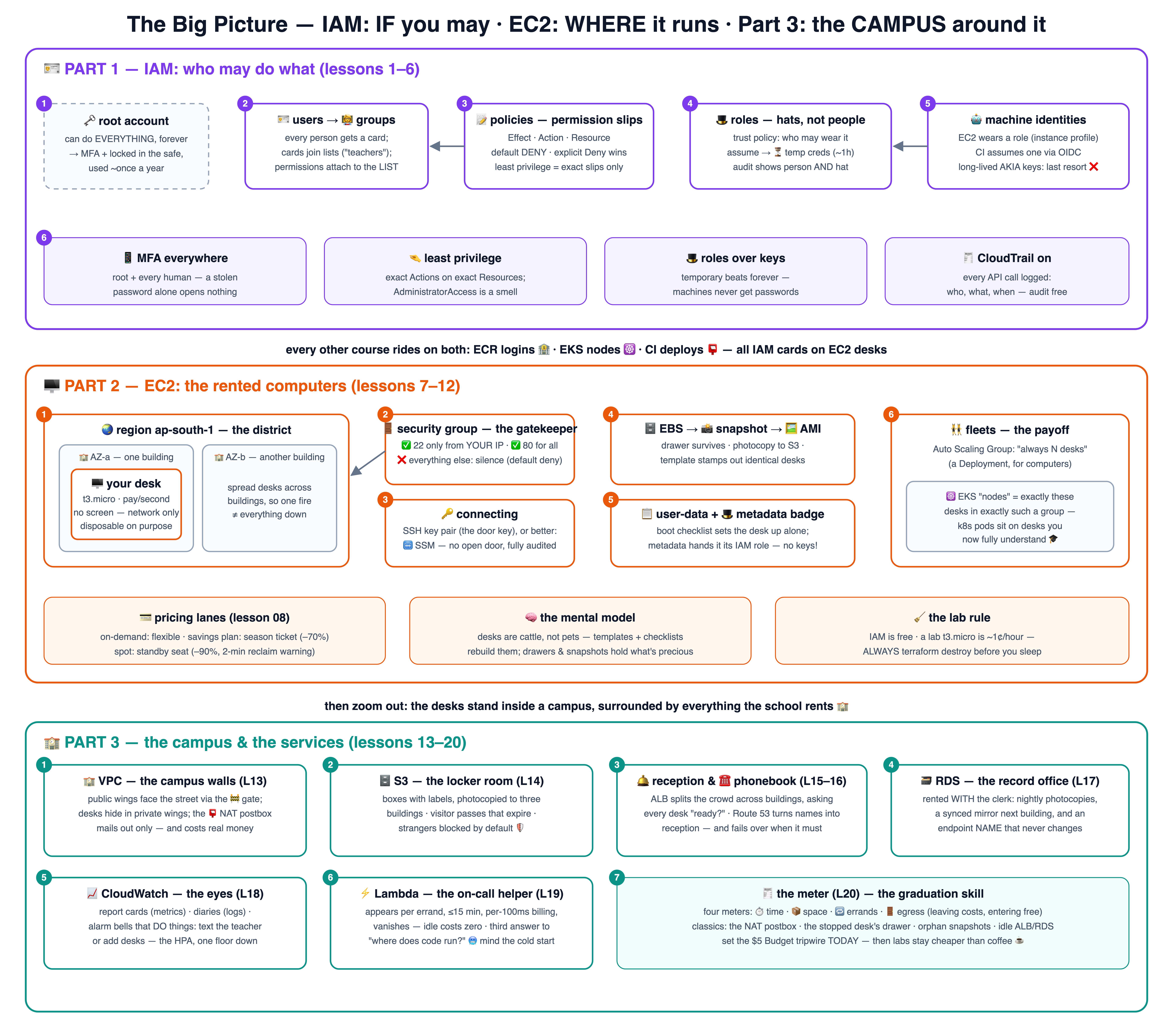
The big picture: IAM decides who may do what; EC2 is the rented computers everything runs on

🗺️ The campus map — where everything stands

Part 3 on one canvas: the VPC campus with its wings and gates, and the services around it — each with a REQUIRED/OPTIONAL badge and its analogy. Click for the 4K version.
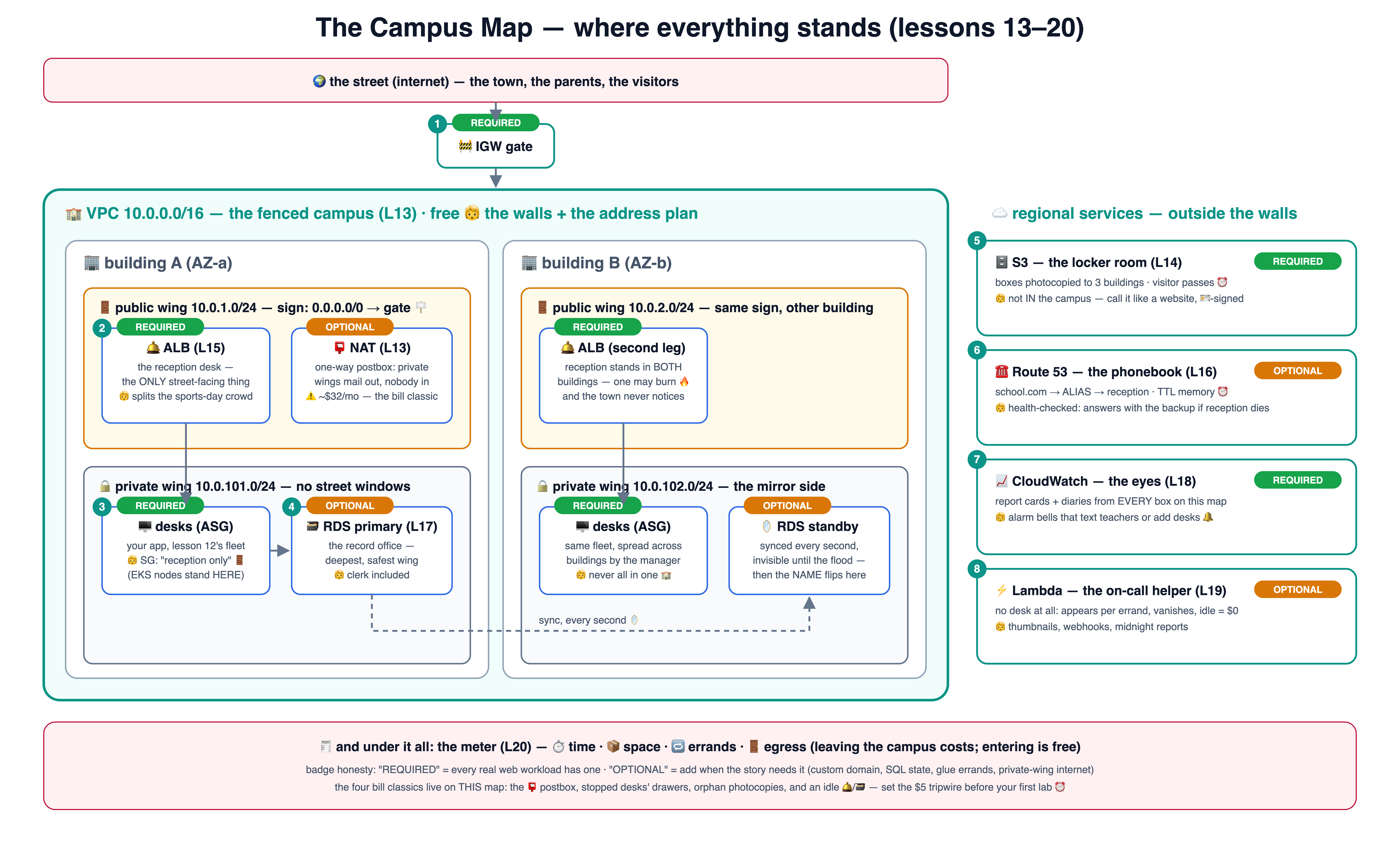
The campus map: VPC with public and private wings across two AZs, IGW, NAT, ALB, and the regional services — S3, Route 53, RDS, CloudWatch, Lambda

🪪 Part 1 — IAM: who may do what (lessons 1–6)

IAM is free — every lab here costs nothing. One git branch = one idea; branch 04 contains lessons 01–04.

1

🗝️ Why IAM

The principal's master key — lock it away, issue ID cards.lesson-01-why-iamRead lesson →See the diagram ↗
2

🪪 Users & groups

Cards and staff lists — permissions attach to the list.lesson-02-users-groupsRead lesson →See the diagram ↗
3

📝 Policies

Permission slips — Effect, Action, Resource; default is NO.lesson-03-policiesRead lesson →See the diagram ↗
4

🎩 Roles

The substitute-teacher hat — worn temporarily, returned always.lesson-04-rolesRead lesson →See the diagram ↗
5

🤖 Machine identities

Badges for robots — EC2 roles & CI via OIDC, keys for nobody.lesson-05-machine-identitiesRead lesson →See the diagram ↗
6

📋 IAM hygiene

The ID-office rules poster — MFA, least privilege, audit.lesson-06-iam-hygieneRead lesson →See the diagram ↗

🖥️ Part 2 — EC2: the rented computers (lessons 7–12)

Labs use a free-tier-eligible t3.micro (otherwise ~1¢/hour) — and every lesson ends with terraform destroy. Never leave a lab desk running overnight.

7

🖥️ What is EC2

A rented desk-computer with no screen, paid by the second.lesson-07-what-is-ec2Read lesson →See the diagram ↗
8

🛵 Types & pricing

Scooter vs truck vs race car — and spot's standby seats.lesson-08-types-pricingRead lesson →See the diagram ↗
9

🔑 Connecting

The door key (SSH) vs the escorted visit (SSM).lesson-09-connectingRead lesson →See the diagram ↗
10

🚪 Security groups

The gatekeeper's guest list — default silence, explicit doors.lesson-10-security-groupsRead lesson →See the diagram ↗
11

🗄️ EBS, snapshots & AMIs

Drawer, photocopy, desk template — what survives what.lesson-11-ebs-snapshots-amiRead lesson →See the diagram ↗
12

🤖 EC2 in real life

Boot checklists, role badges, fleets — and EKS nodes revealed.lesson-12-ec2-in-real-lifeRead lesson →See the diagram ↗

🏫 Part 3 — the campus & the services (lessons 13–20)

Where the desks actually stand — and everything the school rents around them: network, storage, traffic, names, state, eyes, errands, and the meter. VPC/S3/Lambda labs are ~free; the ALB/RDS labs cost pennies if you destroy — which is lesson 20's whole point.

13

🏫 VPC

The campus walls — wings, one gate, corridor signs.lesson-13-vpcRead lesson →See the diagram ↗
14

🗄️ S3

The infinite locker room — boxes, passes, three buildings.lesson-14-s3Read lesson →See the diagram ↗
15

🛎️ Load balancers

The reception that splits crowds — health checks decide.lesson-15-load-balancersRead lesson →See the diagram ↗
16

☎️ Route 53

The phonebook — names to reception, failover included.lesson-16-route53Read lesson →See the diagram ↗
17

🗃️ RDS

The record office you rent — clerk, mirror, photocopies.lesson-17-rdsRead lesson →See the diagram ↗
18

📈 CloudWatch

Report cards, diaries, alarm bells — wired to actions.lesson-18-cloudwatchRead lesson →See the diagram ↗
19

⚡ Lambda

The helper who exists only while called — pay per errand.lesson-19-lambdaRead lesson →See the diagram ↗
20

🧾 The bill

Reading the meter — four meters, four classic surprises.lesson-20-the-billRead lesson →See the diagram ↗
# take the course locally (AWS CLI configured; IAM part is 100% free):
git clone https://github.com/BaluRaut/learn-aws-school.git
cd learn-aws-school
git checkout lesson-01-why-iam          # then open lessons/01-why-iam/README.md
🎓 The school series: 0️⃣ this course lays the AWS foundations → 1️⃣ Docker & ECR packs & ships images → 2️⃣ Kubernetes runs them (on EC2 desks you now understand!) → 3️⃣ ArgoCD deploys them from git, forever.

📐 The lesson diagrams — follow the numbers

Every lesson as one numbered box-and-arrow diagram, one after another — readable right here (purple = IAM, orange = EC2, teal = the campus). Also on a standalone page with jump navigation.

1 🗝️ Why IAM — lock away the master key

One all-powerful login for everyone is how accounts die. IAM gives every person and robot their own checked identity.

🗝️ root account can do EVERYTHING, forever → MFA + locked in the safe 🔒 1 used ~once a year, never daily 🪪 IAM — the ID office 👩‍🏫 user: balasaheb 🤖 role: ci-robot everyone gets their OWN card 2 ☁️ every API call "create instance?" → card checked, slips checked, THEN allowed (or denied) 3

Read full lesson 01 →

2 🪪 Users & groups — cards and staff lists

People get cards; cards join lists; permissions attach to the LIST, not the person.

🪪 user: aarav a person's card 🪪 user: sita 🆕 user: new-teacher 👩‍🏫 group: teachers a list of cards — permissions live HERE 1 3 join the list → powers arrive instantly 📝 policies "may manage EC2" "may read S3 reports" 2 attached to the GROUP

Read full lesson 02 →

3 📝 Policies — reading a permission slip

Four fields decide everything: Effect, Action, Resource, Condition — and the default is always NO.

📝 the permission slip (JSON) "Effect": "Allow" "Action": "ecr:PutImage" "Resource": "…repository/hello-school" "Condition": {"aws:SourceIp": …} = may FILE BOXES, in ONE locker, from school 1️⃣ Effect: Allow or Deny — that's the verdict type (no slip at all = silently denied) 2️⃣ Action: WHAT — service:Verb, wildcards allowed (ecr:* = every ECR verb — use sparingly!) 3️⃣ Resource: ON WHICH THING — the ARN address ("*" = everything — the least-privilege enemy) 4️⃣ evaluation: default DENY → Allow can open → an explicit Deny ALWAYS wins over any Allow

Read full lesson 03 →

4 🎩 Roles — hats, not people

A role is a wearable identity: approved wearers put it on, get temporary credentials, and give it back.

🧑 you (a user) or a service, or CI… 🎩 role: deploy-admin 🤝 trust policy: WHO may wear this hat 📝 permission policies: what the hat may do 1 sts:AssumeRole ⏳ temporary creds valid ~1 hour, then poof — nothing to leak long-term 2 act AS the hat, audit shows "balasaheb, wearing deploy-admin" 3

Read full lesson 04 →

5 🤖 Machine identities — badges for robots, keys for nobody

Machines never get passwords: EC2 wears an instance role; CI assumes a role via OIDC. Long-lived keys are the last resort.

🖥️ EC2 instance wears a role via instance profile — metadata service hands fresh creds 1 📮 CI pipeline (GitHub/CircleCI) proves WHO it is via OIDC → assumes a role for ~15 min 2 🎩 the role least-privilege slips only (iam/ecr-push-policy.json) ☁️ AWS APIs push to ECR, read S3… 3 ❌ the anti-pattern: AKIA… access keys pasted into CI settings — leakable, forever-valid, unrotated

Read full lesson 05 →

6 📋 IAM hygiene — the ID-office rules poster

Four habits that prevent 90% of AWS security incidents.

📱 1 · MFA everywhere root AND every human user — a stolen password alone opens nothing 1 🤏 2 · least privilege exact Actions on exact Resources; AdministratorAccess is a smell, not a default 2 🚫 3 · no root, no stray keys root locked with MFA; prefer roles over access keys; rotate/delete the ones that exist 3 🧾 4 · CloudTrail on = audit for free every API call logged: who, what, when, from where — the school's CCTV, but polite 4

Read full lesson 06 →

7 🖥️ What is EC2 — a rented desk-computer with no screen

An instance is a real computer in AWS's study hall; you talk to it over the network, pay by the hour, and hand it back.

🌏 region: ap-south-1 (Mumbai) — the school district 🏫 AZ-a — one school building 🖥️ i-0abc… your desk 2 vCPU · 1GB RAM · Linux no screen, no keyboard 🏫 AZ-b — another building (spread desks across buildings so one fire ≠ everything down) 2 🧑‍💻 you, at home talk over the network: SSH, HTTP — that's it 1 ⏱️ pay per second while it runs · stop = keep the desk cheap · terminate = hand it back 3

Read full lesson 07 →

8 🛵 Types & pricing — scooters, trucks, and standby seats

Pick the vehicle for the errand, and the payment plan for the pattern.

🛵 t3 — scooter cheap, bursty · dev/small (our labs: t3.micro) 🚗 m — sedan balanced · general apps (EKS nodes often live here) 🏎️ c — race car CPU-heavy · encoding, ML 🚚 r — moving truck RAM-heavy · databases 1 💳 on-demand pay per second, leave anytime — flexible & most expensive 🎫 savings plan / reserved season ticket: commit 1–3 yrs → up to ~70% off steady load 🎟️ spot standby seat: ~90% off, but AWS may reclaim it (2-min warning) 2 rule: steady base → savings plan · spiky extra → on-demand/spot · interruptible work → spot 3

Read full lesson 08 →

9 🔑 Connecting — the door key vs the escorted visit

Classic: SSH with a key pair. Modern: SSM Session Manager — no open door at all.

🔑 key pair public key → on the desk private key → NEVER leaves you 🚪 SSH, port 22 an open (guarded) door — only from YOUR IP (lesson 10) 1 🖥️ the instance ssh ec2-user@IP 🛗 SSM Session Manager NO open port, NO key to lose, every session audited 2 via the SSM agent + the instance's role 🎩 3 modern default: SSM; SSH when you must

Read full lesson 09 →

10 🚪 Security groups — the gatekeeper's guest list

Default: nobody enters. You list exactly who may knock on which door — and replies are let back out automatically.

🧍 security group the gatekeeper + guest list ✅ 22 (SSH) — only from MY house (1.2.3.4/32) ✅ 80 (web) — from anyone ❌ everything else — silence 🖥️ instance never even hears the denied knocks 🧑‍💻 you (your IP) ssh → allowed ✅ 1 🌍 the internet port 80 ✅ · port 22 ❌ 2 stateful: if a request was allowed IN, its reply is allowed OUT — no mirror rules needed 3

Read full lesson 10 →

11 🗄️ EBS, snapshots & AMIs — drawer, photocopy, desk template

The disk outlives reboots; the snapshot is its backup; the AMI stamps out identical ready-made desks.

🖥️ instance the desk — disposable, stop/start/terminate 🗄️ EBS volume the drawer — 8GB here, survives stops & reboots 1 📸 snapshot photocopy of the drawer → S3, incremental, restore anywhere 2 🖼️ AMI — the desk template disk + settings, frozen — launch 1 or 100 IDENTICAL desks from it 3 💡 it's images-and-containers again (Docker course lesson 02) — AMI : instance = image : container, just heavier

Read full lesson 11 →

12 🤖 EC2 in real life — checklists, badges, and fleets

user-data sets desks up alone; the metadata service hands out the role badge; ASGs keep N desks alive — and EKS nodes are exactly this.

📋 user-data boot checklist, runs once: install nginx, start serving 1 🎩 metadata service 169.254.169.254 hands the desk its role badge — IAM meets EC2! 2 🖥️ the instance set up by robots, authorized by its hat, replaceable at any time 👯 Auto Scaling Group "always N desks" — a Deployment, for computers 3 ☸️ EKS "nodes" = exactly these desks, in exactly such a group 4 the punchline of the course: k8s pods sit on desks you now fully understand 🎓

Read full lesson 12 →

13 🏫 VPC — the campus walls

Desks never stood in an open field: a fenced campus with wings, one gate, and corridor signs deciding who can reach the street.

🌍 the street (internet) 🚧 IGW the main gate 1 🏫 VPC 10.0.0.0/16 — the fenced campus 🚪 public wing 10.0.1.0/24 · AZ-a 📮 NAT postbox here 🔒 private wing 10.0.101.0/24 · AZ-a 🖥️ your desks live here 2 3 🪧 corridor signs (route tables): public: 0.0.0.0/0 → gate · private: 0.0.0.0/0 → NAT (out only) 4 "public" just means: this wing's sign points at the gate — that's the whole trick 🪧

Read full lesson 13 →

14 🗄️ S3 — the infinite locker room

Boxes with labels, photocopied to three buildings, opened by ID card — or by a visitor pass that expires.

🖥️ app / CLI signs every call 🪪 🪣 bucket: school-files 📦 key: 2026/class-3A/ photo.jpg (no real folders) 1 🏢🏢🏢 three buildings every box photocopied — 11 nines 2 🧑 visitor with 🎟️ pass presigned URL, expires ⏰ 3 4 🛡️ no pass, no entry Block Public Access: ON → 403

Read full lesson 14 →

15 🛎️ Load balancers — the reception that splits crowds

One address for the whole town; a signboard routes by path; only desks that answer the health check get visitors.

🧑‍🧑‍🧒 the town one address 🛎️ ALB — reception public wings, AZ-a + AZ-b 🔐 HTTPS cert at the door 1 🪧 signboard /api/* → api desks else → web desks 2 📋 target group 🙋 "ready to answer?" every few seconds 3 🖥️ desk AZ-a private wing 🖥️ desk AZ-b private wing 😴 failing checks skipped, not restarted 4 🚄 NLB = the pneumatic tube: raw packets, wire speed (L4)

Read full lesson 15 →

16 ☎️ Route 53 — the school's phonebook

Names become reception desks; the phonebook health-checks reception and answers with the backup campus when it must.

🧒 browser "school.com?" ☎️ Route 53 — hosted zone 📖 ALIAS: school.com → reception (no IP written down — it changes!) 1 🛎️ ALB (lesson 15) 2 🩺 health check /health · every 30 s 3 🏫 backup campus (another region, asleep) 4 ⏰ TTL = how long callers may remember the answer (lower it BEFORE you move)

Read full lesson 16 →

17 🗃️ RDS — the record office you rent

A database with the clerk included: nightly photocopies, a synced mirror in the next building, and an endpoint name that never changes.

🖥️ app private wing ☎️ endpoint (DNS) always the current primary 1 🗃️ primary office AZ-a · private subnet SG: app desks only 2 🪞 standby AZ-b · synced invisible until needed 3 📸 photocopies nightly + point-in-time 4 📚 read replicas async · for reports failover drill: primary floods → the NAME flips to the mirror ~1 min your app just… reconnects 🎩

Read full lesson 17 →

18 📈 CloudWatch — report cards, diaries, alarm bells

Numbers, text, and rules that DO things: text the teacher, or tell the fleet manager to add desks.

🖥️ 🛎️ 🗃️ everything mails numbers & text every minute 📊 metrics CPUUtilization = 87% 📔 diaries (logs) app output · flow logs 1 🔔 alarm CPU > 80% for 5 minutes 2 📱 SNS text the teacher 👯 ASG: +2 desks the HPA's buses, one floor down 3 🔎 Logs Insights grep the diaries at scale 4 🫢 famous surprise: no memory metric without the CloudWatch agent — the desk must tell on itself

Read full lesson 18 →

19 ⚡ Lambda — the helper who exists only while called

An event happens, a helper appears wearing exactly one hat, does one errand, and vanishes. Idle cost: zero.

🔔 events 📦 S3 upload · ⏰ the bell 🌐 URL · 📨 queue ⚡ helper appears 💨 runs hello.py · ≤ 15 min billed per 100 ms 1 🎩 execution role this bucket + logs — nothing else 2 ✅ result → S3 / response 3 👻 gone idle = $0 4 🥶 cold start: a helper who hasn't run lately spends ~100ms–2s putting their shoes on (watch it in the diary's REPORT lines)

Read full lesson 19 →

20 🧾 The bill — reading the meter

Four meters, one itemized bill, and a $5 tripwire that has saved more students than any other feature.

⏱️ time desk-seconds · office-hours 📦 space GB-months exist = pay 🔁 errands per-request, tiny × huge 🚪 the gate (egress) leaving costs, entering free 1 🧾 Cost Explorer the itemized bill: by service · by day · by tag 2 ⏰ Budget alarm at $5 the tripwire — set it TODAY, before any other lab 3 😱 the classics: NAT postbox · stopped desk's drawer (EBS) · orphan snapshots · idle ALB/RDS — labs that skip destroy become subscriptions 4

Read full lesson 20 →

Start Lesson 01 → 📐 All 20 lesson diagrams 🧪 Quiz 🗓️ Study plan ⏮️ Before & trade-offs 🍱 Next course: Docker