๐Ÿฑ Learn Docker & ECR the school way

Course 1 of 3 in the school trilogy โ€” before Kubernetes runs your app and ArgoCD deploys it, something has to pack and ship it. That's this course: images, Dockerfiles, compose and multi-stage builds on your laptop, then registries and AWS ECR in the cloud.

๐Ÿฑ images๐ŸŽ‚ layers ๐Ÿ“ Dockerfiles๐Ÿฝ๏ธ compose ๐Ÿ‘จโ€๐Ÿณ multi-stage๐Ÿฆ AWS ECR

๐Ÿณ Part 1 โ€” PACK IT (laptop only)

  • why containers end "works on my machine"
  • images = layer cakes ๐ŸŽ‚; the build cache
  • run, ports, env, logs, volumes, networks
  • compose the whole table; multi-stage; hygiene

โ˜๏ธ Part 2 โ€” SHIP IT (registries & ECR)

  • registries: the frozen-lunchbox warehouse ๐Ÿฌ
  • rent your bank locker: a private ECR repo ๐Ÿฆ
  • tag โ†’ login (12h pass) โ†’ push โ†’ pull from EKS
  • janitor rules, scans, and CI doing it all for you

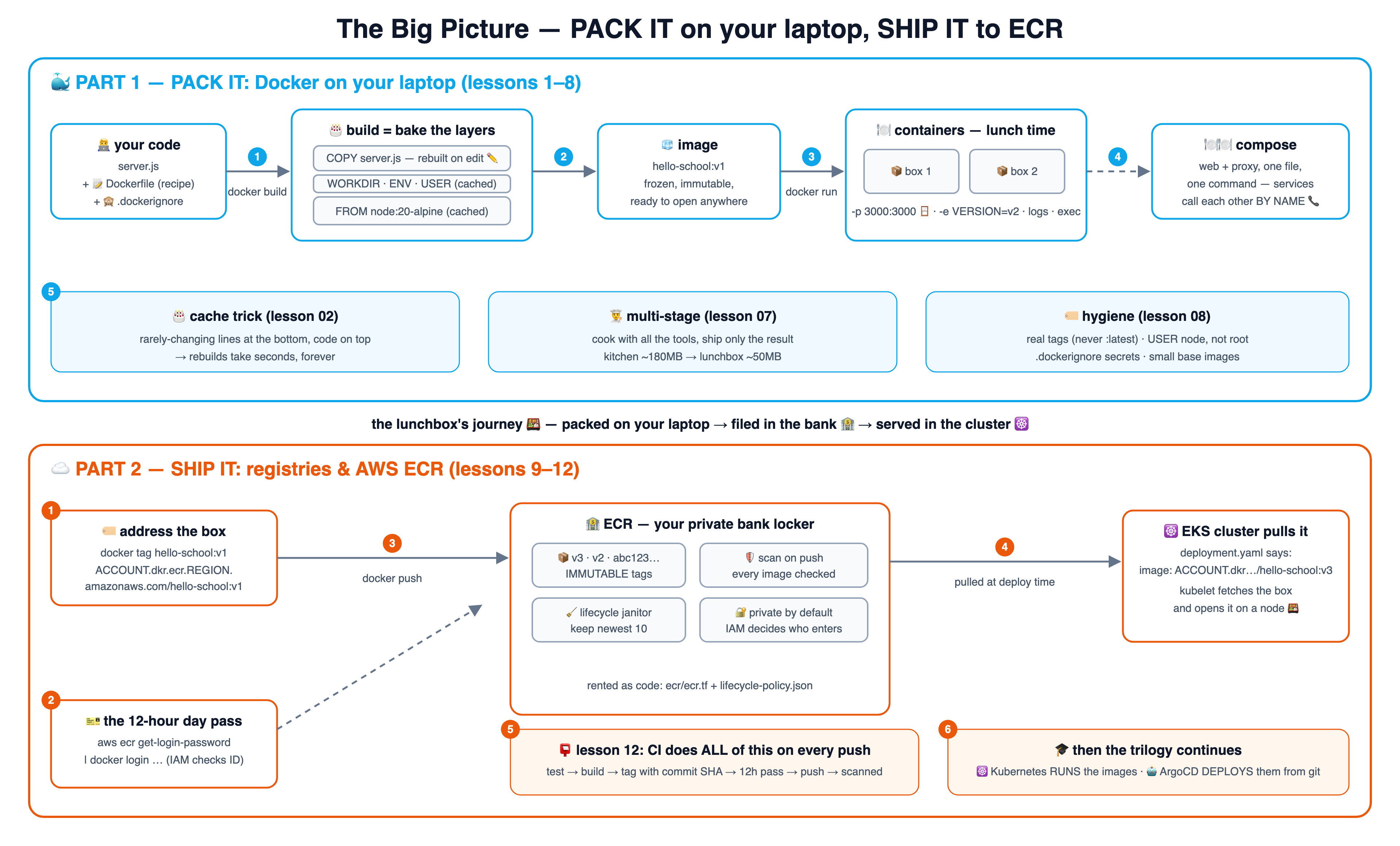
๐Ÿ—บ๏ธ The big picture โ€” one diagram, the whole journey

The whole course on one canvas: PACK IT (blue, lessons 1โ€“8) and SHIP IT (orange, lessons 9โ€“12). Click it for the 4K version โ€” great as a single reference.

The big picture: building Docker images locally, then shipping them to AWS ECR and on to Kubernetes

๐Ÿณ Part 1 โ€” PACK IT: Docker on your laptop (lessons 1โ€“8)

Only Docker Desktop needed โ€” zero cloud, zero cost. One git branch = one idea; branch 07 contains lessons 01โ€“07.

1

๐Ÿฑ Why containers

The packed lunchbox โ€” identical on every machine.lesson-01-why-containersRead lesson โ†’See the diagram โ†—
2

๐ŸŽ‚ Images & layers

A layer cake โ€” unchanged layers come from the cache.lesson-02-images-layersRead lesson โ†’See the diagram โ†—
3

๐Ÿ“ The Dockerfile

The recipe card โ€” seven lines cover 95% of real files.lesson-03-dockerfileRead lesson โ†’See the diagram โ†—
4

๐Ÿฝ๏ธ Running containers

Lunch time โ€” ports are the serving window.lesson-04-run-containersRead lesson โ†’See the diagram โ†—
5

๐ŸงŠ Volumes & networks

The shared fridge and the intercom โ€” data and calls by name.lesson-05-volumes-networksRead lesson โ†’See the diagram โ†—
6

๐Ÿฝ๏ธ๐Ÿฝ๏ธ Docker Compose

Set the whole table with one command.lesson-06-docker-composeRead lesson โ†’See the diagram โ†—
7

๐Ÿ‘จโ€๐Ÿณ Multi-stage builds

Cook in the kitchen, pack only the food โ€” tiny images.lesson-07-multi-stageRead lesson โ†’See the diagram โ†—
8

๐Ÿท๏ธ Image hygiene

Label your boxes; never pack your house keys.lesson-08-image-hygieneRead lesson โ†’See the diagram โ†—

โ˜๏ธ Part 2 โ€” SHIP IT: registries & AWS ECR (lessons 9โ€“12)

The bridge from laptop to cloud: where images live so that clusters can pull them. Uses a real AWS account (pennies; cleanup shown).

9

๐Ÿฌ Registries

The frozen-lunchbox warehouse โ€” push once, pull anywhere.lesson-09-registriesRead lesson โ†’See the diagram โ†—
10

๐Ÿฆ ECR setup

Rent the bank locker; get your 12-hour day pass.lesson-10-ecr-setupRead lesson โ†’See the diagram โ†—
11

๐Ÿงน Push, pull & lifecycle

File the boxes; the janitor keeps only the newest ten.lesson-11-push-pull-lifecycleRead lesson โ†’See the diagram โ†—
12

๐Ÿ“ฎ CI to cloud

The courier files the copies โ€” and hands off to k8s & ArgoCD.lesson-12-ci-to-cloudRead lesson โ†’See the diagram โ†—
# take the course locally (just Docker Desktop for Part 1):
git clone https://github.com/BaluRaut/learn-docker-school.git
cd learn-docker-school
git checkout lesson-01-why-containers   # then open lessons/01-why-containers/README.md
๐ŸŽ“ The school series: 0๏ธโƒฃ AWS foundations (IAM & EC2) โ†’ 1๏ธโƒฃ this course packs & ships images โ†’ 2๏ธโƒฃ Learn Kubernetes School runs them at scale โ†’ 3๏ธโƒฃ Learn ArgoCD School deploys them automatically, forever. Same style, same analogies universe, same demo-app family.

๐Ÿ“ The lesson diagrams โ€” follow the numbers

Every lesson as one numbered box-and-arrow diagram, one after another โ€” readable right here (blue = Docker, orange = ECR). Also on a standalone page with jump navigation.

1 ๐Ÿฑ Why containers โ€” the end of "works on my machine"

Pack the app WITH everything it needs; every machine opens the identical box.

๐Ÿง‘โ€๐Ÿ’ป your laptop: works! node 20 installed, all libs there ๐Ÿ’ฅ teammate's laptop: crash node 14, missing libs, wrong path 1 the naked-app problem ๐Ÿฑ the container app + node 20 + libs + config everything INSIDE the box (shares the host's kernel โ€” way lighter than a VM) 2 ๐Ÿ’ป laptop A โœ… ๐Ÿ’ป laptop B โœ… โ˜๏ธ AWS server โœ… 3 identical, everywhere

Read full lesson 01 โ†’

2 ๐ŸŽ‚ Images & layers โ€” the cake and the cache

Every Dockerfile line bakes one layer; unchanged layers are reused from cache.

๐ŸŽ‚ image = a layer cake FROM node:20-alpine (pre-baked) WORKDIR /app COPY server.js . CMD ["node","server.js"] 1 ๐Ÿ” build again, nothing changed every layer from cache โ†’ finishes in ~1 second 2 โœ๏ธ edit server.js bottom layers: cached โœ… COPY + above: rebuilt ๐Ÿ”จ 3 ๐Ÿ’ก the trick order lines from rarely-changing (bottom) to often-changing (top) = fast builds forever

Read full lesson 02 โ†’

3 ๐Ÿ“ The Dockerfile โ€” reading the recipe card line by line

Seven instructions cover 95% of real Dockerfiles โ€” this repo's app uses them all.

๐Ÿ“ app/Dockerfile FROM node:20-alpine WORKDIR /app COPY server.js . ENV PORT=3000 EXPOSE 3000 USER node CMD ["node","server.js"] 1๏ธโƒฃ start from a pre-baked box: tiny Linux + Node โ€” you never install Node yourself again 2๏ธโƒฃ COPY puts YOUR code inside the box (.dockerignore decides what may enter) 3๏ธโƒฃ ENV = default settings ยท EXPOSE = documentation ("this app listens on 3000") 4๏ธโƒฃ USER: don't run as root (lesson 08) ยท CMD: what happens when the box is opened โ€” exactly ONE process per container, in the foreground

Read full lesson 03 โ†’

4 ๐Ÿฝ๏ธ Running containers โ€” lunch time

docker run opens the box; ports are the serving window; logs and exec are your eyes and hands.

๐ŸงŠ image hello-school:v1 ๐Ÿƒ container node server.js (PID 1) own filesystem, own network -e APP_VERSION=v2 โ†’ settings in 1 docker run ๐ŸชŸ -p 3000:3000 laptop:3000 โ†’ box:3000 2 ๐Ÿ“œ docker logs ๐Ÿ”ง docker exec 3 ๐Ÿ›‘ docker stop โ†’ SIGTERM, clean exit 4

Read full lesson 04 โ†’

5 ๐ŸงŠ๐Ÿ“ž Volumes & networks โ€” the shared fridge and the intercom

Containers are disposable; volumes make data survive. Networks let containers call each other by NAME.

๐Ÿ“ž docker network โ€” the intercom ๐Ÿ“ฆ container "web" the app ๐Ÿ“ฆ container "proxy" calls http://web:3000 1 a NAME, not an IP โ€” Docker DNS resolves it (k8s Services say hi ๐Ÿ‘‹) ๐ŸงŠ volume โ€” the fridge lives OUTSIDE containers, survives docker rm ๐Ÿ’ช 2 ๐Ÿ“‚ bind mount a laptop folder mapped in โ€” live-edit code & config 3

Read full lesson 05 โ†’

6 ๐Ÿฝ๏ธ๐Ÿฝ๏ธ Docker Compose โ€” set the whole table with one command

One YAML file describes every service; docker compose up builds and starts them all, wired together.

๐Ÿ“„ compose.yml web: build ./app proxy: nginx + config ports: 8080:80 1 ๐Ÿฝ๏ธ the table โ€” one shared network ๐Ÿ“ฆ web the app ยท NOT exposed reachable only by name ๐Ÿ“ฆ proxy nginx โ†’ http://web:3000 ๐ŸชŸ the ONLY door: :8080 3 2 compose up --build one command up ยท one command down (docker compose down) ยท same file works on every teammate's laptop 4

Read full lesson 06 โ†’

7 ๐Ÿ‘จโ€๐Ÿณ Multi-stage builds โ€” cook in the kitchen, pack only the food

Build tools live in a throwaway stage; only the result ships. Images shrink dramatically.

๐Ÿ‘จโ€๐Ÿณ stage 1: the KITCHEN FROM node:20-alpine AS builder node + tools + source (~180MB) RUN node generate.js โ†’ index.html ๐Ÿ—‘๏ธ thrown away after the build 1 ๐Ÿฑ stage 2: the LUNCHBOX FROM nginx:alpine (~50MB) COPY --from=builder index.html no node, no tools, no source โ€” just the result. THIS ships. ๐Ÿš€ 3 2 only the food crosses smaller image = faster pushes/pulls (lesson 11), fewer things to attack (lesson 08)

Read full lesson 07 โ†’

8 ๐Ÿท๏ธ Image hygiene โ€” label your boxes, don't pack your keys

The four habits that separate hobby images from production images.

๐Ÿท๏ธ 1 ยท real tags, never :latest in prod hello-school:v1 / :git-sha โ€” ":latest" is a floating label; you can't roll back to "latest" 1 ๐Ÿ™ˆ 2 ยท .dockerignore everything private .git, .env, node_modules, logs โ€” COPY can't leak what it cannot see 2 ๐Ÿ‘ค 3 ยท USER node โ€” never run as root a break-in to a root container is a break-in to the machine; drop privileges in the image 3 ๐Ÿชถ 4 ยท small base images (alpine/slim) node:20 โ‰ˆ 1.1GB vs node:20-alpine โ‰ˆ 180MB โ€” less to pull, less to patch, less to attack 4

Read full lesson 08 โ†’

9 ๐Ÿฌ Registries โ€” the frozen-lunchbox warehouse

A registry stores images so OTHER machines can pull them โ€” the bridge from laptop to cloud.

๐Ÿง‘โ€๐Ÿ’ป your laptop image built locally ๐Ÿฌ registry โ€” the warehouse ๐Ÿ“š repository: hello-school shelf for ONE app's versions ๐Ÿท๏ธ tags: v1, v2, abc123โ€ฆ ๐Ÿ”ข digest = tamper-proof fingerprint 1 docker push โ˜ธ๏ธ EKS cluster pulls at deploy ๐Ÿ’ป teammate docker pull 2 Docker Hub = the public warehouse ยท ECR = your company's private one (next lesson) 3

Read full lesson 09 โ†’

10 ๐Ÿฆ ECR setup โ€” renting the bank locker

Create a private repository once; get a fresh 12-hour pass whenever you visit.

๐Ÿ—๏ธ rent the locker (once) terraform apply (ecr/ecr.tf) or: aws ecr create-repository 1 โ˜๏ธ AWS โ€” ECR ๐Ÿ” repository: hello-school (private) address: ACCOUNT.dkr.ecr.REGION.amazonaws.com/hello-school ๐ŸŽซ the 12-hour day pass aws ecr get-login-password | docker login โ€ฆ 2 3 now docker push/pull may enter ๐Ÿ”‘ who may enter at all = IAM (your AWS user/role needs ecr:* permissions โ€” the bank checks ID first)

Read full lesson 10 โ†’

11 ๐Ÿงน Push, pull & lifecycle โ€” filing boxes and the janitor

The tag IS the address; push files the box, EKS pulls it, the janitor keeps the locker tidy.

๐Ÿท๏ธ address the box docker tag hello-school:v1 \ ACCOUNT.dkrโ€ฆ/hello-school:v1 1 ๐Ÿฆ ECR locker ๐Ÿ“ฆ v3 (newest) ๐Ÿ“ฆ v2 ๐Ÿ“ฆ v-oldโ€ฆ expired ๐Ÿงน 2 docker push โ˜ธ๏ธ EKS deployment image: ACCOUNT.dkrโ€ฆ/ hello-school:v3 โ†’ pulled 3 ๐Ÿงน lifecycle policy "keep newest 10, expire rest" (ecr/lifecycle-policy.json) 4

Read full lesson 11 โ†’

12 ๐Ÿ“ฎ CI to cloud โ€” the courier files the copies

In real life a robot does lessons 1โ€“11 on every push โ€” and hands the baton to the next two courses.

๐Ÿง‘โ€๐Ÿ’ป dev git push ๐Ÿ“ฎ CI โ€” the courier robot โœ… test โ†’ ๐Ÿฑ build โ†’ ๐Ÿท๏ธ tag = commit SHA โ†’ ๐Ÿ”‘ 12h pass โ†’ push (the k8s course's CircleCI does exactly this) 1 ๐Ÿฆ ECR ๐Ÿ›ก๏ธ scan on push โ€” every image checked for known vulnerabilities 2 โ˜ธ๏ธ next course: Kubernetes RUNS these images across a cluster ๐Ÿค– then: ArgoCD DEPLOYS them from git, automatically, forever 3 4

Read full lesson 12 โ†’

Start Lesson 01 โ†’ ๐Ÿ“ All 12 lesson diagrams ๐Ÿงช Quiz ๐Ÿ—“๏ธ Study plan โฎ๏ธ Before & trade-offs โ˜ธ๏ธ Next course: Kubernetes