🪪 Learn AWS the school way — IAM, EC2 & the campus
The foundations course of the school series: the two AWS ideas every other course stands on. IAM is the ID-card office — who may do what. EC2 is the rented computer — the desk everything ultimately runs on. ECR logins, EKS nodes, CI roles: it's all these two, wearing different costumes. And in Part 3 the campus itself appears: network, storage, traffic, names, state, eyes, errands — and the bill. 🧾
🪪 Part 1 — IAM: who may do what
- lock away the root master key 🗝️
- ID cards (users), staff lists (groups), slips (policies)
- hats, not people: roles & temporary credentials 🎩
- badges for robots — machines never get passwords 🤖
🖥️ Part 2 — EC2: the rented computers
- a Linux desk with no screen, paid by the second
- scooters vs trucks; standby-seat (spot) pricing 🛵
- the gatekeeper's guest list (security groups) 🚪
- drawers, photocopies, desk templates — EBS & AMIs 🗄️
🏫 Part 3 — the campus & the services
- campus walls, wings, and the one-way postbox 📮
- the infinite locker room & visitor passes 🗄️🎟️
- reception, phonebook, record office 🛎️☎️🗃️
- report cards, on-call helpers, the meter 📈⚡🧾
🗺️ The big picture — one diagram, both worlds
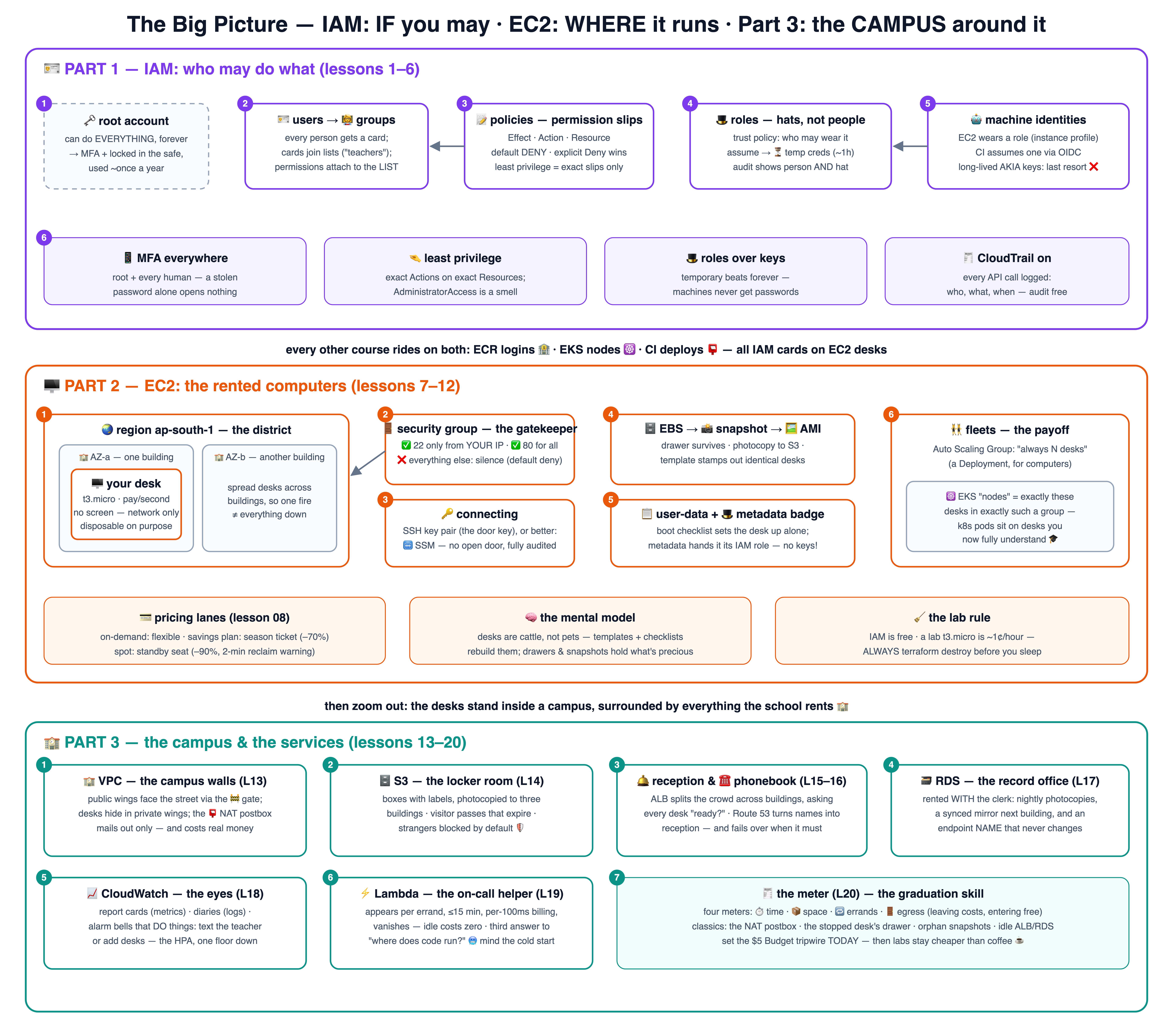
The whole course on one canvas: IAM (purple, lessons 1–6), EC2 (orange, lessons 7–12), and the campus & services (teal, lessons 13–20). Click it for the 4K version.
🗺️ The campus map — where everything stands
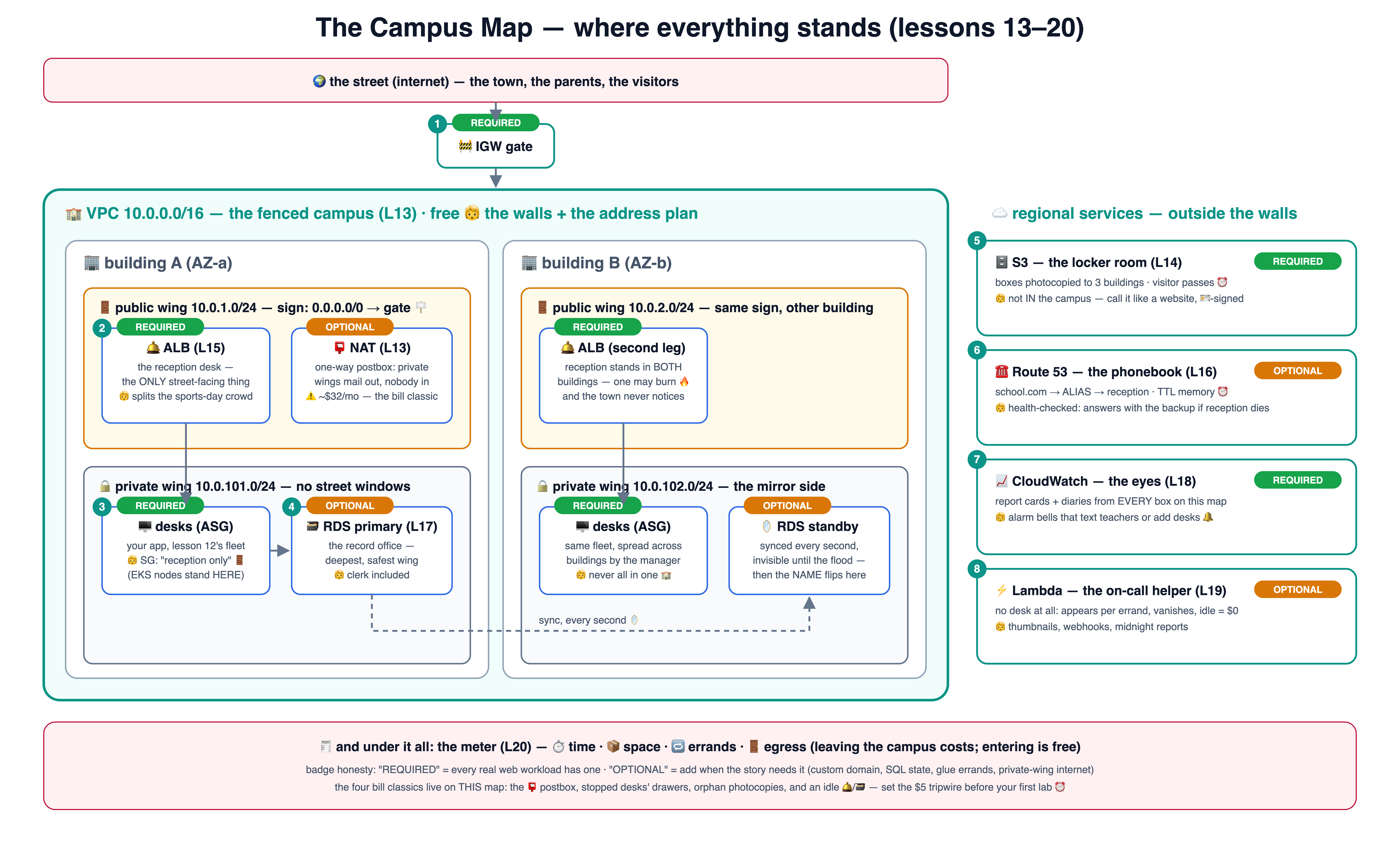
Part 3 on one canvas: the VPC campus with its wings and gates, and the services around it — each with a REQUIRED/OPTIONAL badge and its analogy. Click for the 4K version.
🪪 Part 1 — IAM: who may do what (lessons 1–6)
IAM is free — every lab here costs nothing. One git branch = one idea; branch 04 contains lessons 01–04.
🗝️ Why IAM
lesson-01-why-iamRead lesson →See the diagram ↗🪪 Users & groups
lesson-02-users-groupsRead lesson →See the diagram ↗📝 Policies
lesson-03-policiesRead lesson →See the diagram ↗🎩 Roles
lesson-04-rolesRead lesson →See the diagram ↗🤖 Machine identities
lesson-05-machine-identitiesRead lesson →See the diagram ↗📋 IAM hygiene
lesson-06-iam-hygieneRead lesson →See the diagram ↗🖥️ Part 2 — EC2: the rented computers (lessons 7–12)
Labs use a free-tier-eligible t3.micro (otherwise ~1¢/hour) — and every
lesson ends with terraform destroy. Never leave a lab desk running overnight.
🖥️ What is EC2
lesson-07-what-is-ec2Read lesson →See the diagram ↗🛵 Types & pricing
lesson-08-types-pricingRead lesson →See the diagram ↗🔑 Connecting
lesson-09-connectingRead lesson →See the diagram ↗🚪 Security groups
lesson-10-security-groupsRead lesson →See the diagram ↗🗄️ EBS, snapshots & AMIs
lesson-11-ebs-snapshots-amiRead lesson →See the diagram ↗🤖 EC2 in real life
lesson-12-ec2-in-real-lifeRead lesson →See the diagram ↗🏫 Part 3 — the campus & the services (lessons 13–20)
Where the desks actually stand — and everything the school rents around them: network, storage, traffic, names, state, eyes, errands, and the meter. VPC/S3/Lambda labs are ~free; the ALB/RDS labs cost pennies if you destroy — which is lesson 20's whole point.
🏫 VPC
lesson-13-vpcRead lesson →See the diagram ↗🗄️ S3
lesson-14-s3Read lesson →See the diagram ↗🛎️ Load balancers
lesson-15-load-balancersRead lesson →See the diagram ↗☎️ Route 53
lesson-16-route53Read lesson →See the diagram ↗🗃️ RDS
lesson-17-rdsRead lesson →See the diagram ↗📈 CloudWatch
lesson-18-cloudwatchRead lesson →See the diagram ↗⚡ Lambda
lesson-19-lambdaRead lesson →See the diagram ↗🧾 The bill
lesson-20-the-billRead lesson →See the diagram ↗# take the course locally (AWS CLI configured; IAM part is 100% free):
git clone https://github.com/BaluRaut/learn-aws-school.git
cd learn-aws-school
git checkout lesson-01-why-iam # then open lessons/01-why-iam/README.md📐 The lesson diagrams — follow the numbers
Every lesson as one numbered box-and-arrow diagram, one after another — readable right here (purple = IAM, orange = EC2, teal = the campus). Also on a standalone page with jump navigation.
1 🗝️ Why IAM — lock away the master key
One all-powerful login for everyone is how accounts die. IAM gives every person and robot their own checked identity.
2 🪪 Users & groups — cards and staff lists
People get cards; cards join lists; permissions attach to the LIST, not the person.
3 📝 Policies — reading a permission slip
Four fields decide everything: Effect, Action, Resource, Condition — and the default is always NO.
4 🎩 Roles — hats, not people
A role is a wearable identity: approved wearers put it on, get temporary credentials, and give it back.
5 🤖 Machine identities — badges for robots, keys for nobody
Machines never get passwords: EC2 wears an instance role; CI assumes a role via OIDC. Long-lived keys are the last resort.
6 📋 IAM hygiene — the ID-office rules poster
Four habits that prevent 90% of AWS security incidents.
7 🖥️ What is EC2 — a rented desk-computer with no screen
An instance is a real computer in AWS's study hall; you talk to it over the network, pay by the hour, and hand it back.
8 🛵 Types & pricing — scooters, trucks, and standby seats
Pick the vehicle for the errand, and the payment plan for the pattern.
9 🔑 Connecting — the door key vs the escorted visit
Classic: SSH with a key pair. Modern: SSM Session Manager — no open door at all.
10 🚪 Security groups — the gatekeeper's guest list
Default: nobody enters. You list exactly who may knock on which door — and replies are let back out automatically.
11 🗄️ EBS, snapshots & AMIs — drawer, photocopy, desk template
The disk outlives reboots; the snapshot is its backup; the AMI stamps out identical ready-made desks.
12 🤖 EC2 in real life — checklists, badges, and fleets
user-data sets desks up alone; the metadata service hands out the role badge; ASGs keep N desks alive — and EKS nodes are exactly this.
13 🏫 VPC — the campus walls
Desks never stood in an open field: a fenced campus with wings, one gate, and corridor signs deciding who can reach the street.
14 🗄️ S3 — the infinite locker room
Boxes with labels, photocopied to three buildings, opened by ID card — or by a visitor pass that expires.
15 🛎️ Load balancers — the reception that splits crowds
One address for the whole town; a signboard routes by path; only desks that answer the health check get visitors.
16 ☎️ Route 53 — the school's phonebook
Names become reception desks; the phonebook health-checks reception and answers with the backup campus when it must.
17 🗃️ RDS — the record office you rent
A database with the clerk included: nightly photocopies, a synced mirror in the next building, and an endpoint name that never changes.
18 📈 CloudWatch — report cards, diaries, alarm bells
Numbers, text, and rules that DO things: text the teacher, or tell the fleet manager to add desks.
19 ⚡ Lambda — the helper who exists only while called
An event happens, a helper appears wearing exactly one hat, does one errand, and vanishes. Idle cost: zero.
20 🧾 The bill — reading the meter
Four meters, one itemized bill, and a $5 tripwire that has saved more students than any other feature.