🍱 Learn Docker & ECR the school way
Course 1 of 3 in the school trilogy — before Kubernetes runs your app and ArgoCD deploys it, something has to pack and ship it. That's this course: images, Dockerfiles, compose and multi-stage builds on your laptop, then registries and AWS ECR in the cloud.
🐳 Part 1 — PACK IT (laptop only)
- why containers end "works on my machine"
- images = layer cakes 🎂; the build cache
- run, ports, env, logs, volumes, networks
- compose the whole table; multi-stage; hygiene
☁️ Part 2 — SHIP IT (registries & ECR)
- registries: the frozen-lunchbox warehouse 🏬
- rent your bank locker: a private ECR repo 🏦
- tag → login (12h pass) → push → pull from EKS
- janitor rules, scans, and CI doing it all for you
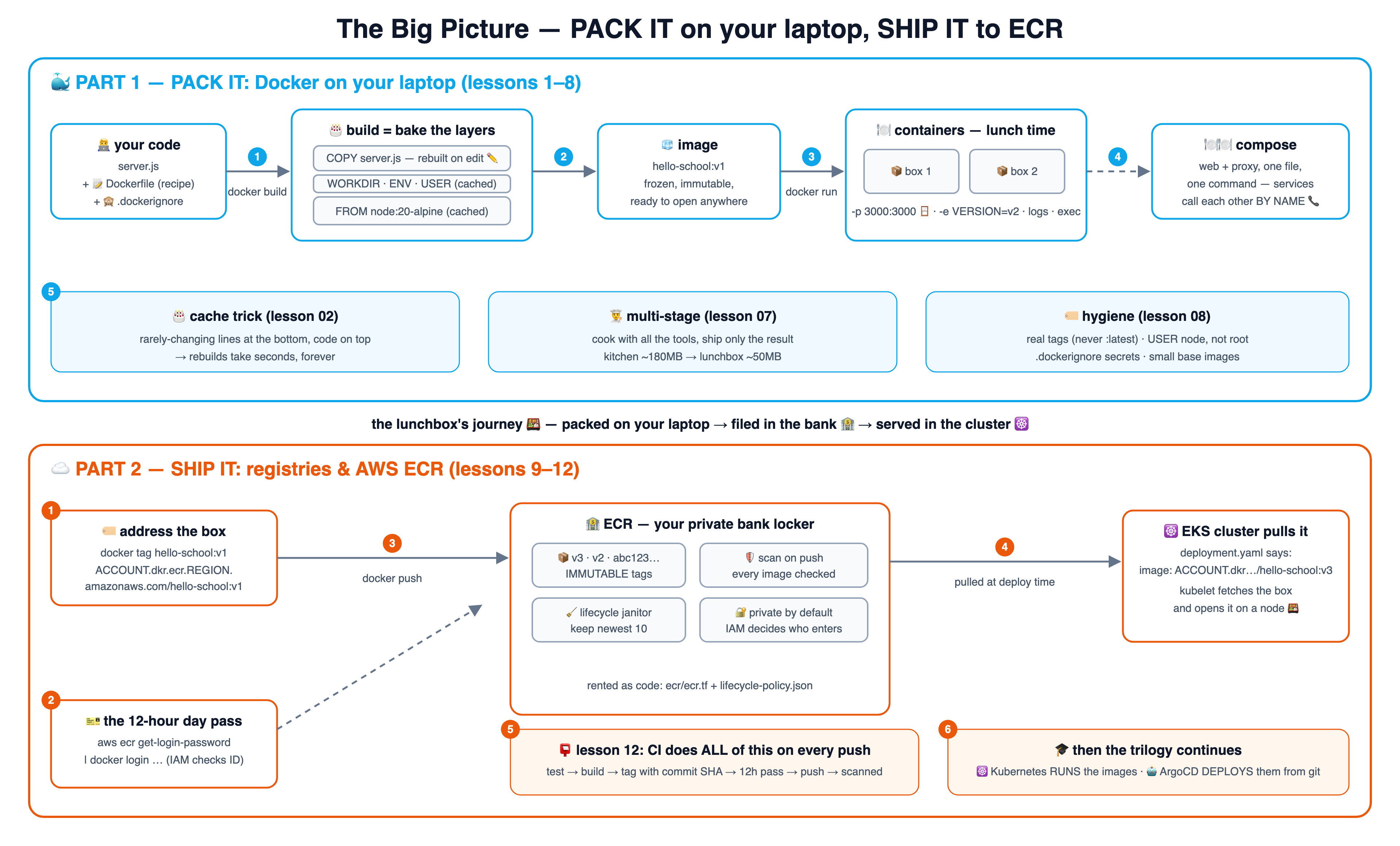
🗺️ The big picture — one diagram, the whole journey
The whole course on one canvas: PACK IT (blue, lessons 1–8) and SHIP IT (orange, lessons 9–12). Click it for the 4K version — great as a single reference.
🐳 Part 1 — PACK IT: Docker on your laptop (lessons 1–8)
Only Docker Desktop needed — zero cloud, zero cost. One git branch = one idea; branch 07 contains lessons 01–07.
🍱 Why containers
lesson-01-why-containersRead lesson →See the diagram ↗🎂 Images & layers
lesson-02-images-layersRead lesson →See the diagram ↗📝 The Dockerfile
lesson-03-dockerfileRead lesson →See the diagram ↗🍽️ Running containers
lesson-04-run-containersRead lesson →See the diagram ↗🧊 Volumes & networks
lesson-05-volumes-networksRead lesson →See the diagram ↗🍽️🍽️ Docker Compose
lesson-06-docker-composeRead lesson →See the diagram ↗👨🍳 Multi-stage builds
lesson-07-multi-stageRead lesson →See the diagram ↗🏷️ Image hygiene
lesson-08-image-hygieneRead lesson →See the diagram ↗☁️ Part 2 — SHIP IT: registries & AWS ECR (lessons 9–12)
The bridge from laptop to cloud: where images live so that clusters can pull them. Uses a real AWS account (pennies; cleanup shown).
🏬 Registries
lesson-09-registriesRead lesson →See the diagram ↗🏦 ECR setup
lesson-10-ecr-setupRead lesson →See the diagram ↗🧹 Push, pull & lifecycle
lesson-11-push-pull-lifecycleRead lesson →See the diagram ↗📮 CI to cloud
lesson-12-ci-to-cloudRead lesson →See the diagram ↗# take the course locally (just Docker Desktop for Part 1):
git clone https://github.com/BaluRaut/learn-docker-school.git
cd learn-docker-school
git checkout lesson-01-why-containers # then open lessons/01-why-containers/README.md📐 The lesson diagrams — follow the numbers
Every lesson as one numbered box-and-arrow diagram, one after another — readable right here (blue = Docker, orange = ECR). Also on a standalone page with jump navigation.
1 🍱 Why containers — the end of "works on my machine"
Pack the app WITH everything it needs; every machine opens the identical box.
2 🎂 Images & layers — the cake and the cache
Every Dockerfile line bakes one layer; unchanged layers are reused from cache.
3 📝 The Dockerfile — reading the recipe card line by line
Seven instructions cover 95% of real Dockerfiles — this repo's app uses them all.
4 🍽️ Running containers — lunch time
docker run opens the box; ports are the serving window; logs and exec are your eyes and hands.
5 🧊📞 Volumes & networks — the shared fridge and the intercom
Containers are disposable; volumes make data survive. Networks let containers call each other by NAME.
6 🍽️🍽️ Docker Compose — set the whole table with one command
One YAML file describes every service; docker compose up builds and starts them all, wired together.
7 👨🍳 Multi-stage builds — cook in the kitchen, pack only the food
Build tools live in a throwaway stage; only the result ships. Images shrink dramatically.
8 🏷️ Image hygiene — label your boxes, don't pack your keys
The four habits that separate hobby images from production images.
9 🏬 Registries — the frozen-lunchbox warehouse
A registry stores images so OTHER machines can pull them — the bridge from laptop to cloud.
10 🏦 ECR setup — renting the bank locker
Create a private repository once; get a fresh 12-hour pass whenever you visit.
11 🧹 Push, pull & lifecycle — filing boxes and the janitor
The tag IS the address; push files the box, EKS pulls it, the janitor keeps the locker tidy.
12 📮 CI to cloud — the courier files the copies
In real life a robot does lessons 1–11 on every push — and hands the baton to the next two courses.