🏫 School Platform — learn Kubernetes step-by-step
One real project — a school management system with two services — used to teach every DevOps tool with a job to do. Complex ideas, explained like you're five, with school analogies, diagrams and hands-on labs.
Open the checklist → · Study plan →
🗺️ The big picture — one diagram, the whole school
All 26 lessons on one canvas. Click for the 4K version.
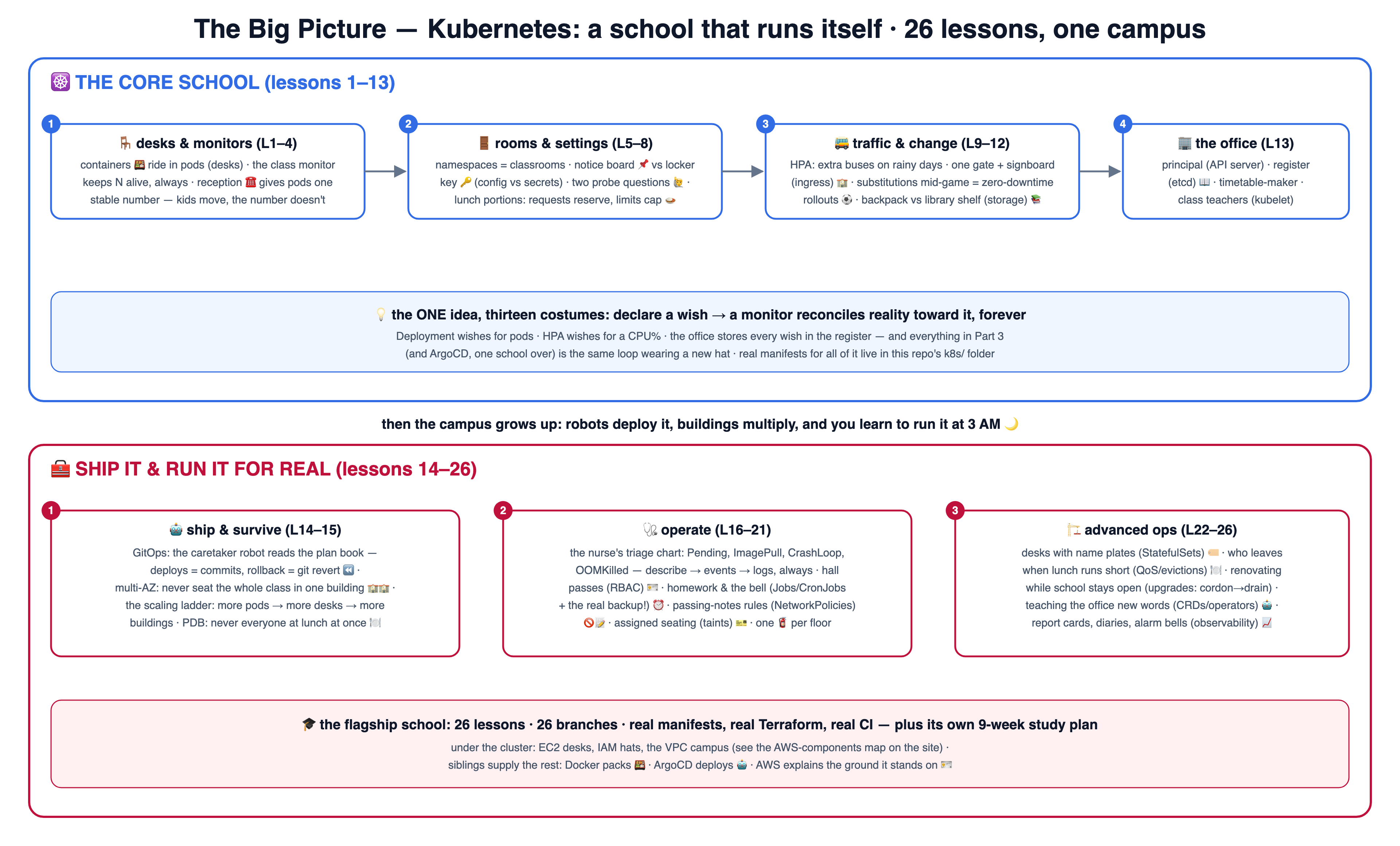
🎓 The 26 lessons
📅 Not sure how to pace it? Follow the 9-week study plan — sequence, time estimates, weekly milestones and a capstone, with progress saved in your browser.
Lessons live on branches — branch 05 contains lessons 01–05, so you can stop and resume anywhere. Click a card to read the lesson right on GitHub (diagrams render there), or check the branch out locally. Prefer pictures? All 14 lessons are also drawn as numbered box-and-arrow diagrams on one page.
🍱 Containers & images
lesson-01-containersRead lesson →See the diagram ↗🪑 Pods
lesson-02-podsRead lesson →See the diagram ↗🧑🏫 Deployments
lesson-03-deploymentsRead lesson →See the diagram ↗☎️ Services
lesson-04-servicesRead lesson →See the diagram ↗🚪 Namespaces
lesson-05-namespacesRead lesson →See the diagram ↗🔑 ConfigMaps & Secrets
lesson-06-configmaps-secretsRead lesson →See the diagram ↗🙋 Health probes
lesson-07-health-probesRead lesson →See the diagram ↗🍛 Requests & limits
lesson-08-resourcesRead lesson →See the diagram ↗🚌 Autoscaling
lesson-09-autoscalingRead lesson →See the diagram ↗🏫 Ingress
lesson-10-ingressRead lesson →See the diagram ↗⚽ Rollouts & rollbacks
lesson-11-rolloutsRead lesson →See the diagram ↗📚 Storage & state
lesson-12-storageRead lesson →See the diagram ↗🏢 Under the hood
lesson-13-under-the-hoodRead lesson →See the diagram ↗🤖 Bonus: CI/CD & ArgoCD
lesson-14-deploy-gitopsRead lesson →See the diagram ↗🏫🏫 Bonus: Multi-AZ & scaling
lesson-15-multi-az-scalingRead lesson →See the diagram ↗🧰 Part 3 — running it for real (lessons 16–26)
The cluster stands — now learn to operate it: debug it, secure it, schedule it, upgrade it, extend it, and watch it breathe. Same format, same school.
🩺 Debugging playbook
lesson-16-debuggingRead lesson →See the diagram ↗🪪 RBAC & ServiceAccounts
lesson-17-rbacRead lesson →See the diagram ↗⏰ Jobs & CronJobs
lesson-18-jobs-cronjobsRead lesson →See the diagram ↗🚫📝 NetworkPolicies
lesson-19-network-policiesRead lesson →See the diagram ↗🎫 Taints & affinity
lesson-20-taints-affinityRead lesson →See the diagram ↗🧯 DaemonSets
lesson-21-daemonsetsRead lesson →See the diagram ↗🏷️ StatefulSets
lesson-22-statefulsetsRead lesson →See the diagram ↗🍽️ QoS & evictions
lesson-23-qos-evictionsRead lesson →See the diagram ↗🏗️ Cluster upgrades
lesson-24-cluster-upgradesRead lesson →See the diagram ↗🤖 CRDs & operators
lesson-25-crds-operatorsRead lesson →See the diagram ↗📈 Observability
lesson-26-observabilityRead lesson →See the diagram ↗# take the course locally:
git clone https://github.com/BaluRaut/learn-kubernetes-school.git
cd learn-kubernetes-school
git checkout lesson-01-containers # then open lessons/01-containers/README.md☸️ The real k8s manifests
The actual YAML files the lessons teach — every one heavily commented, in k8s/. Read them in this order (it's also the apply order):
🔑 secret.example.yaml
lesson 06Open file →🧑🏫 deployment.yaml
lessons 03 · 07 · 08 · 11Open file →☎️ service.yaml
lesson 04Open file →🐍 analytics-deployment.yaml
lessons 03 · 04Open file →🏫 ingress.yaml
lesson 10Open file →☁️ The AWS components under the cluster — purpose, required or optional
"Is EC2 connected to Kubernetes?" — completely: Kubernetes doesn't replace EC2,
it sits on top of it. Every node you see in kubectl get nodes IS an EC2 instance
(a rented desk 🖥️); an EKS node group is an Auto Scaling Group of those desks; the HPA adds
pods and, when they no longer fit, the cluster autoscaler asks the ASG for more desks.
A NotReady node is usually an EC2 story underneath (spot reclaimed, instance died).
The map below shows every AWS piece this repo's terraform/
touches — what each is for, and whether it's
REQUIRED or OPTIONAL.
Click for the 4K version.
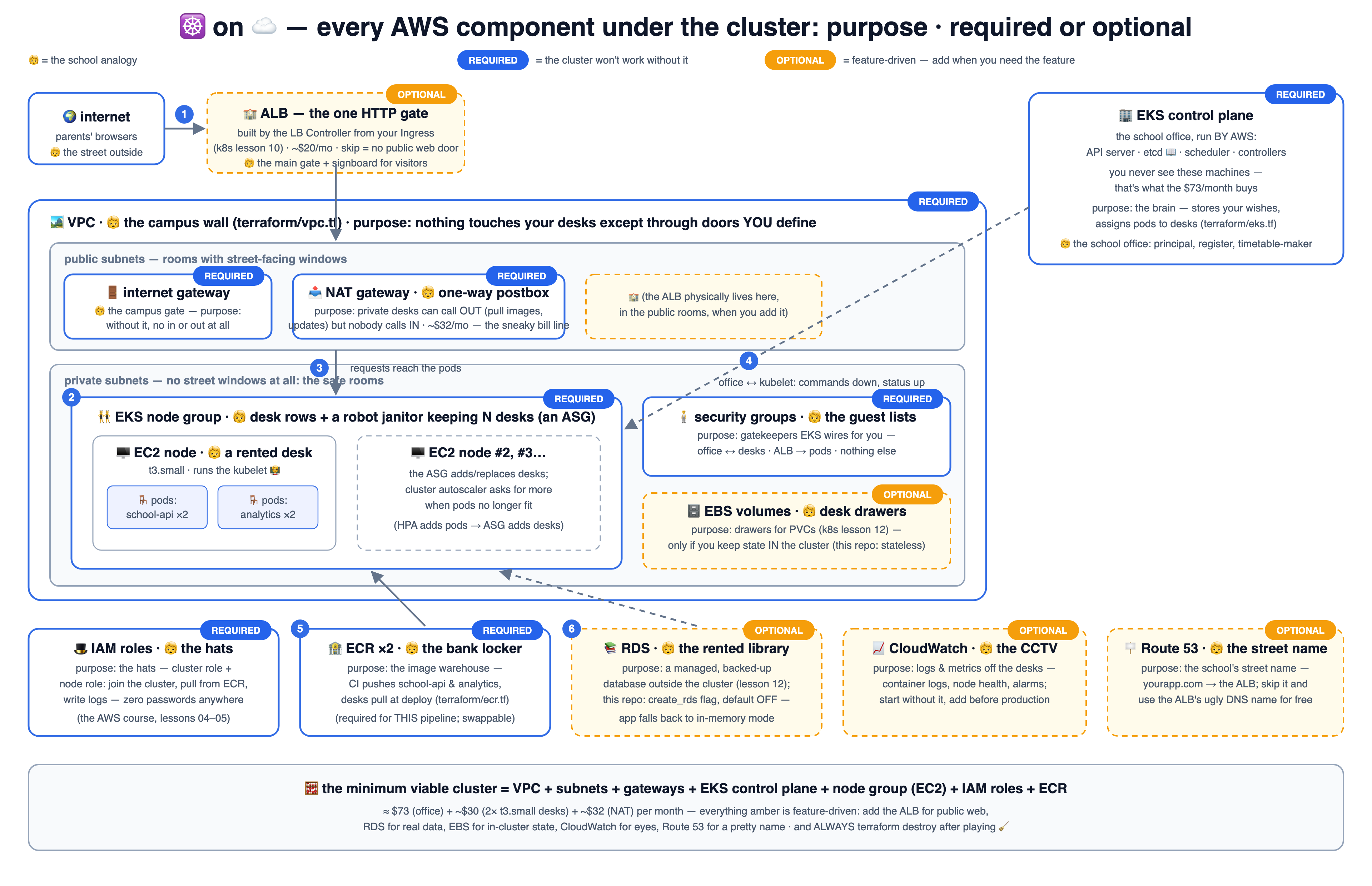
Deep-dive on the two foundations (IAM & EC2) in the AWS foundations course — its lesson 12 is exactly this reveal.
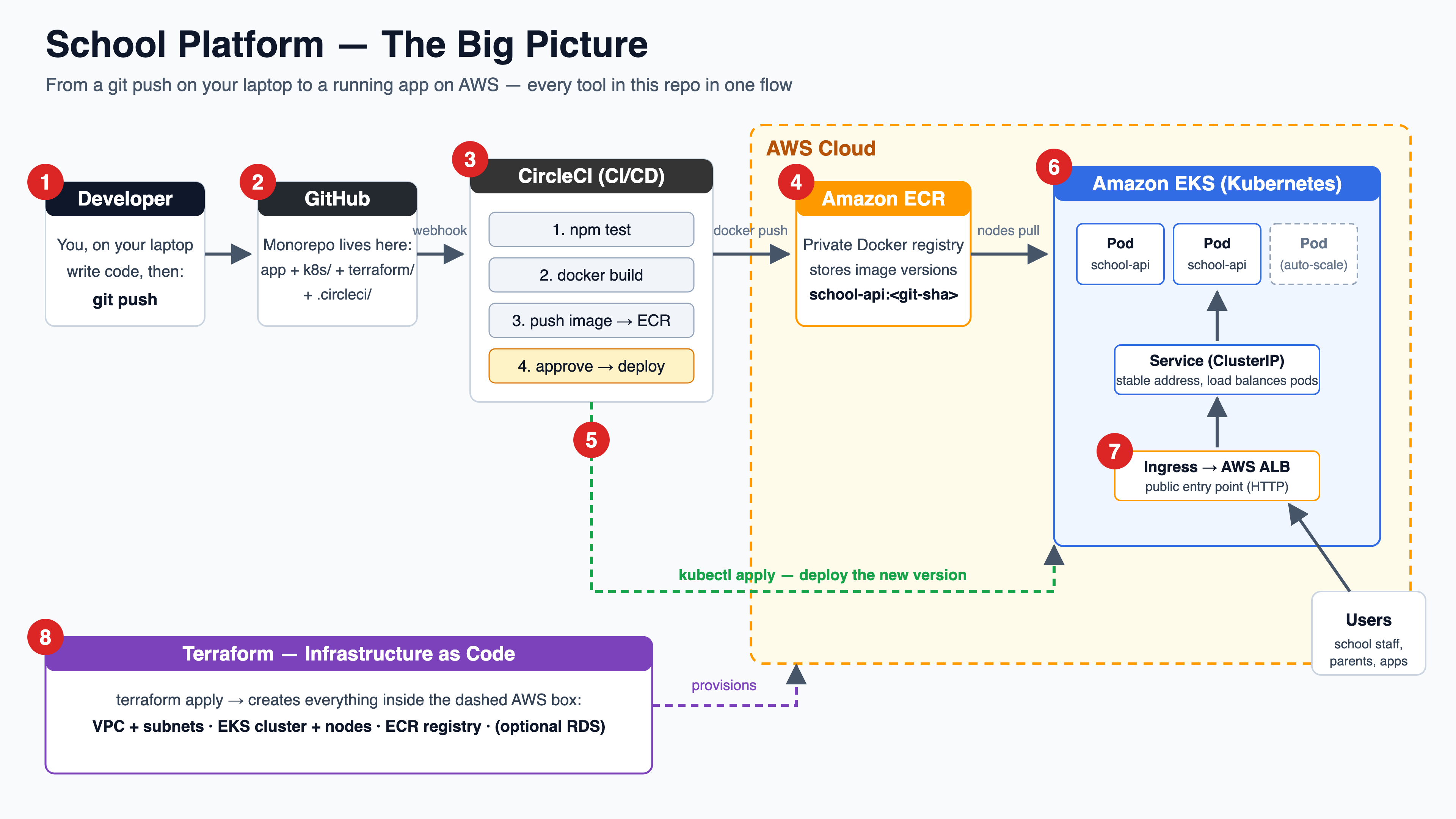
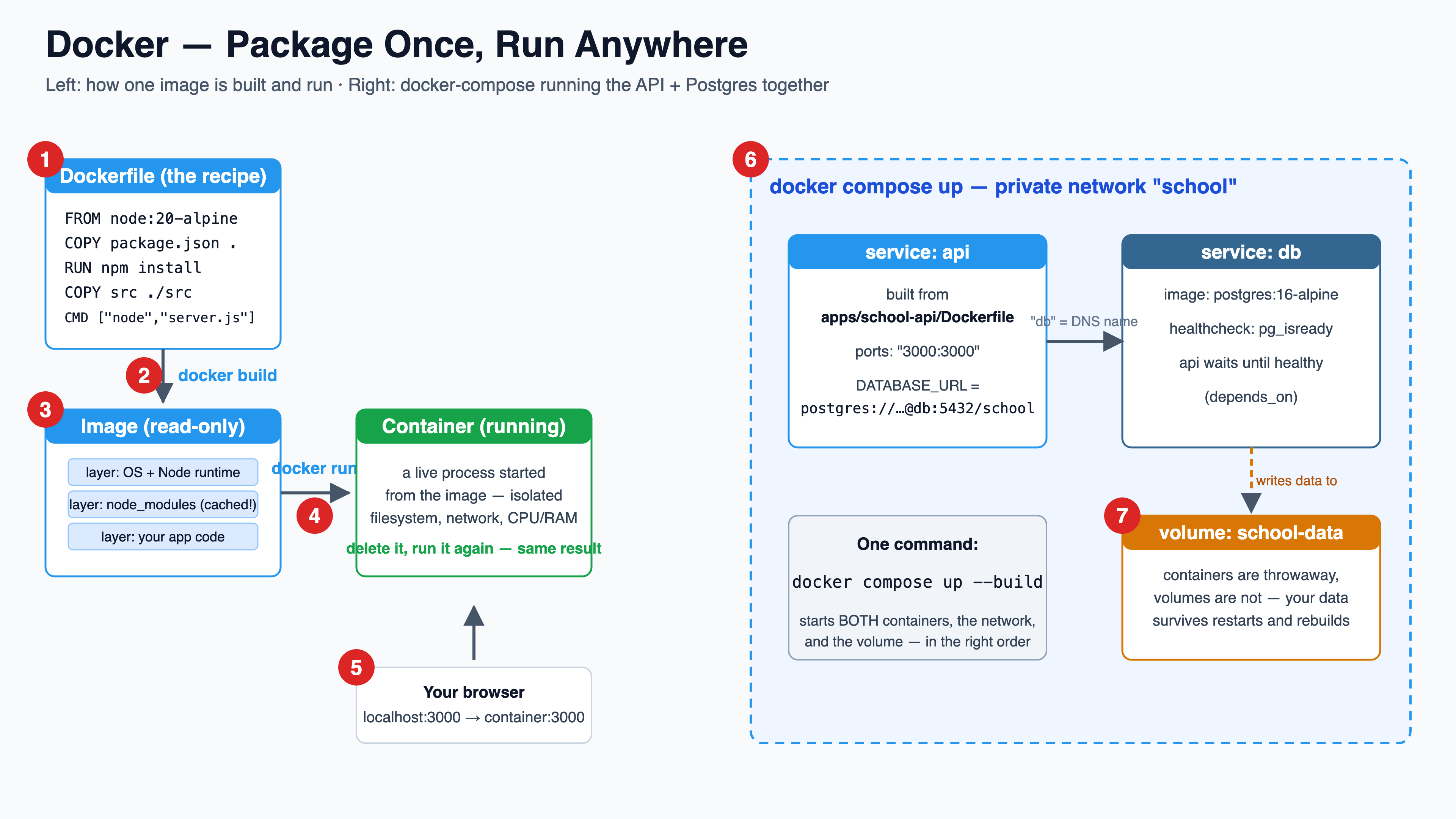
🗺️ The architecture diagrams
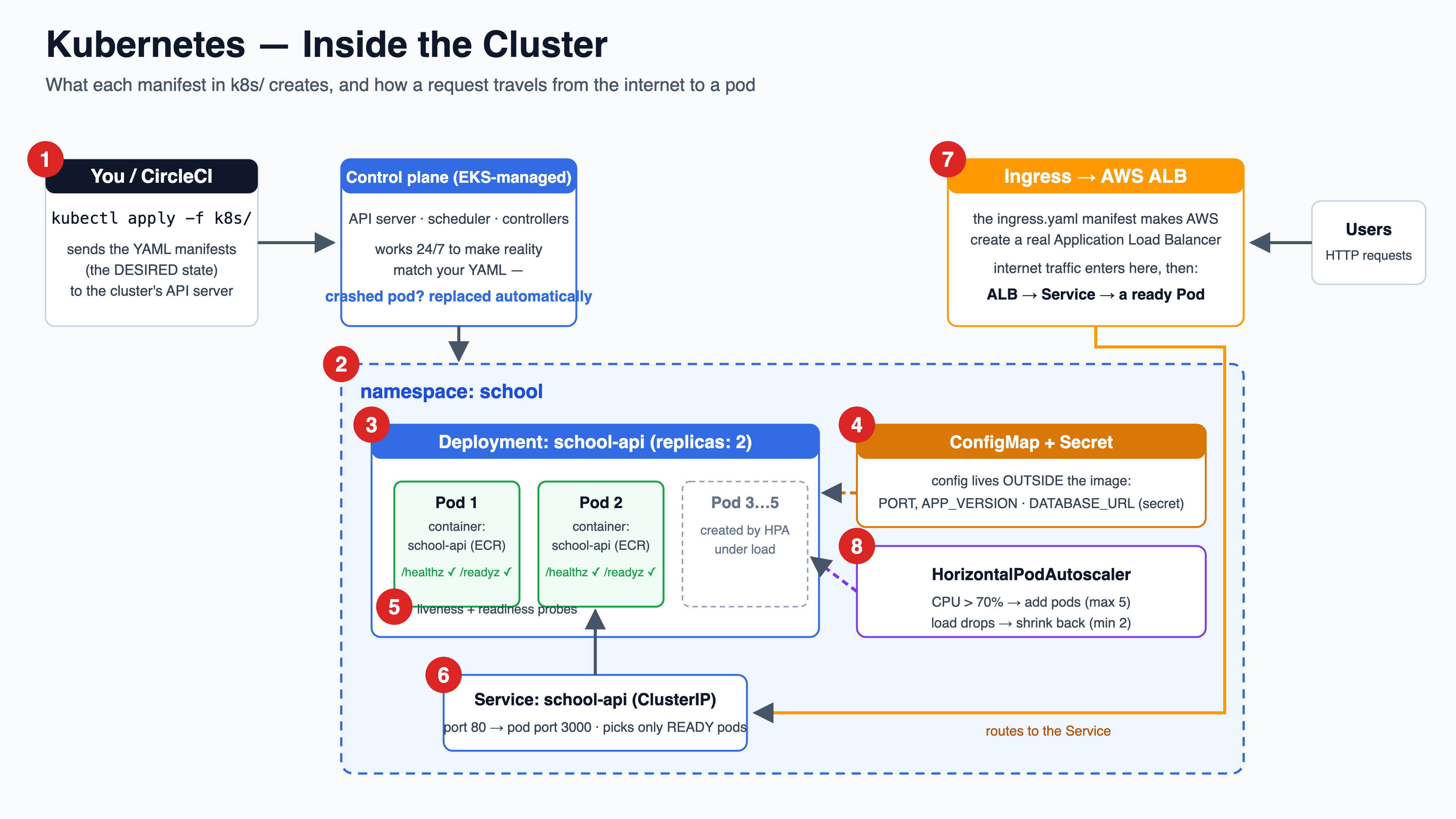
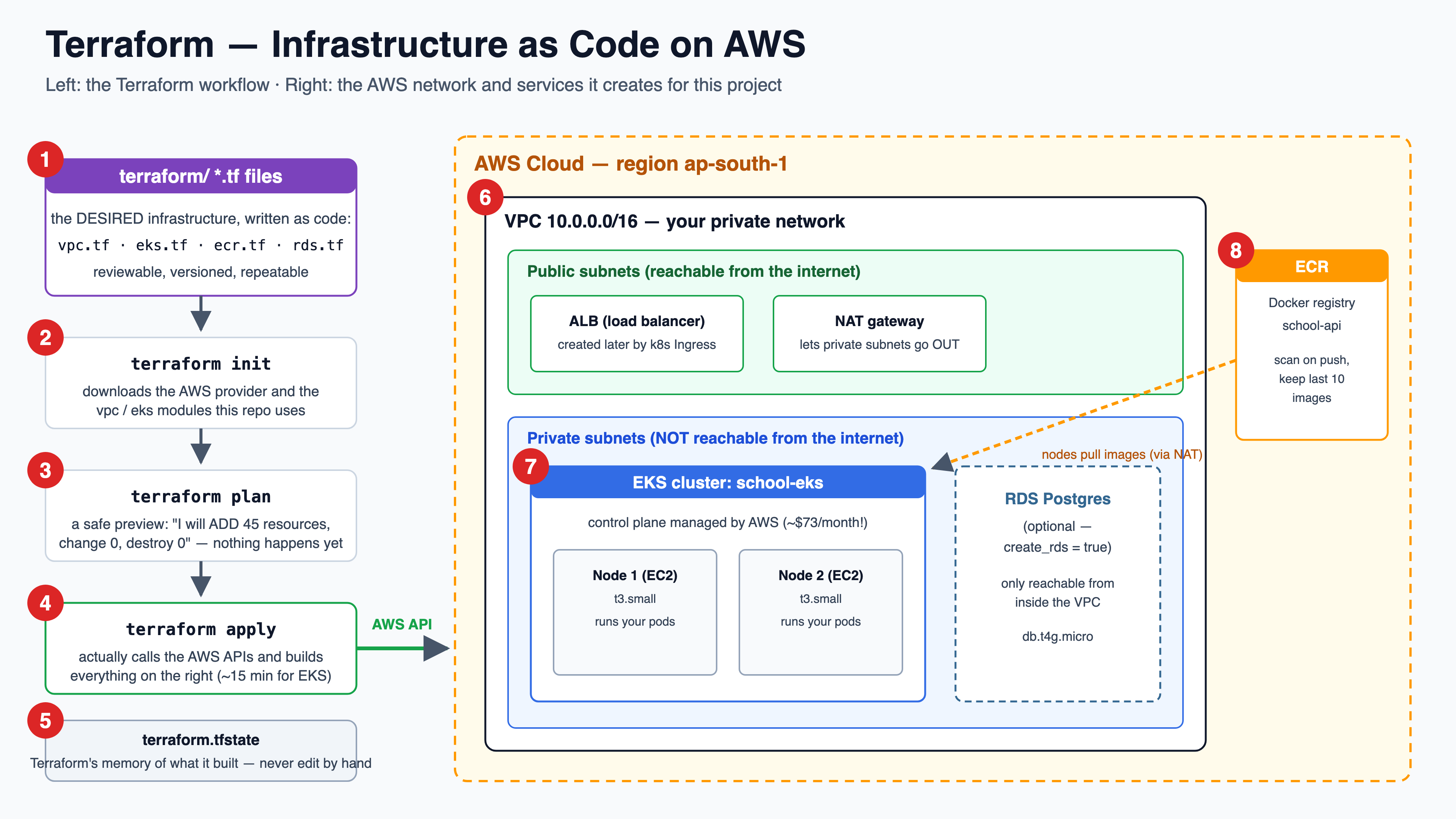
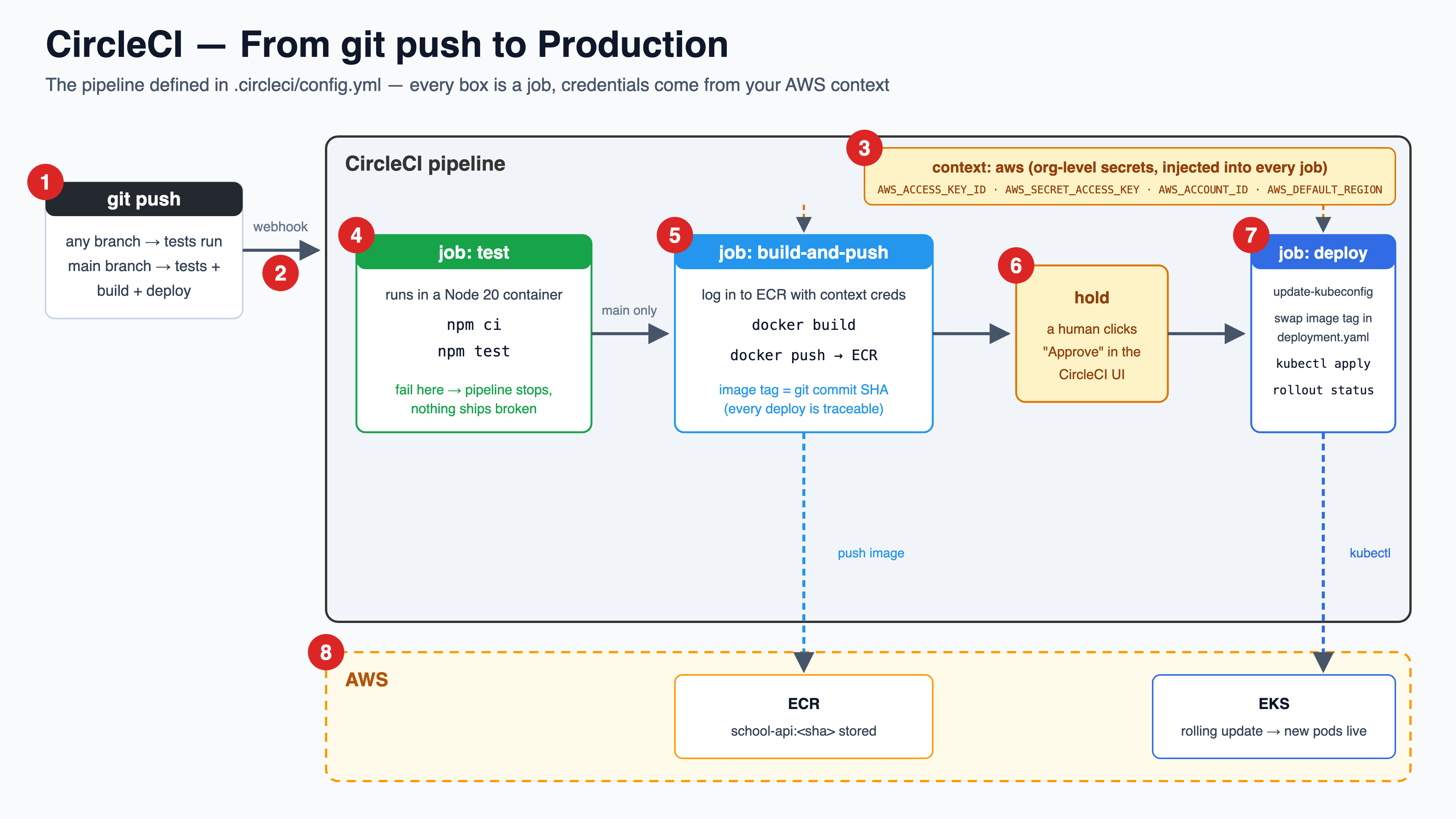
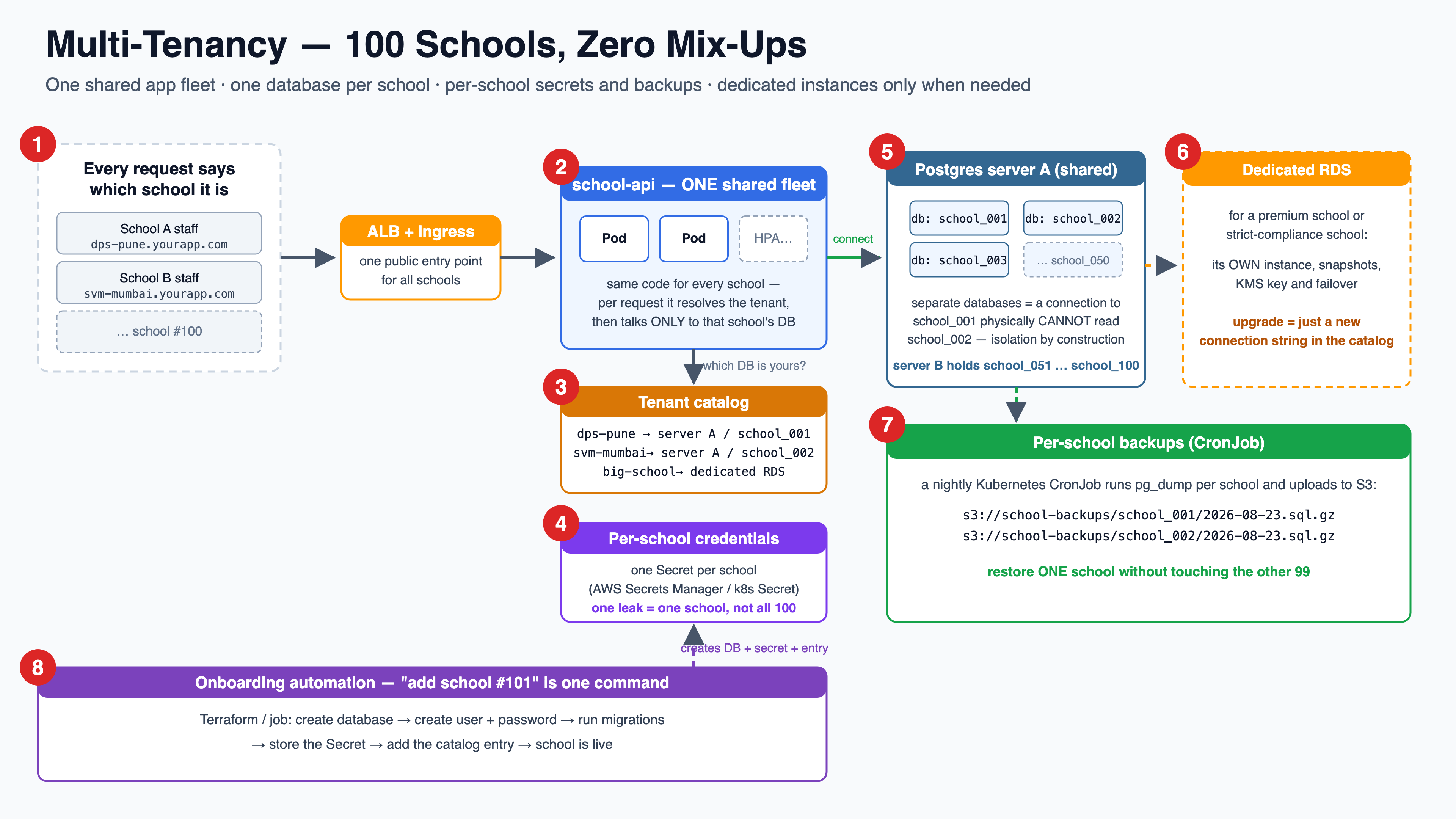
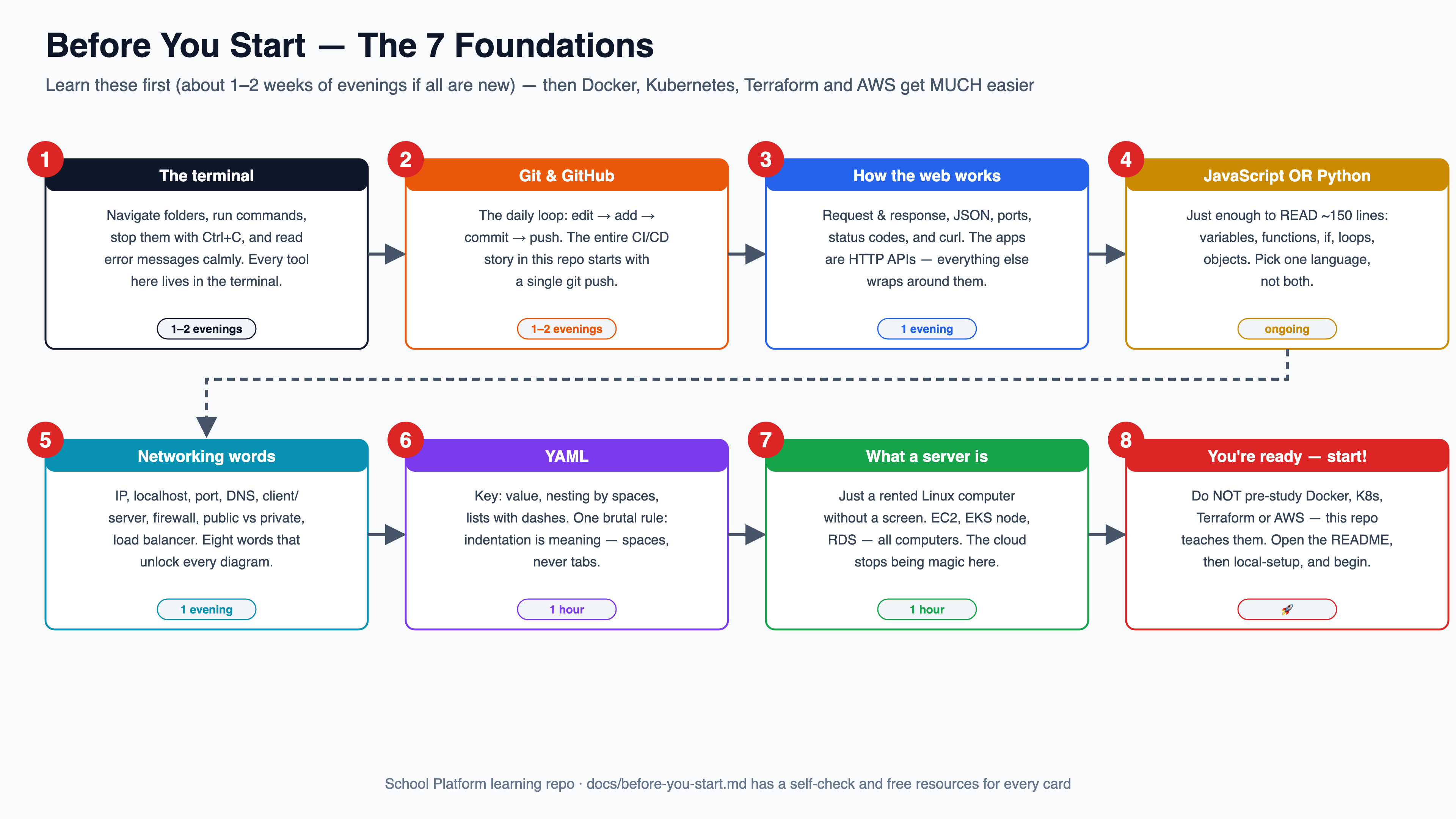
The big numbered diagrams from the README, one after another — readable right here; click any to open the 4K version. Every one is also explained step-by-step in the README.
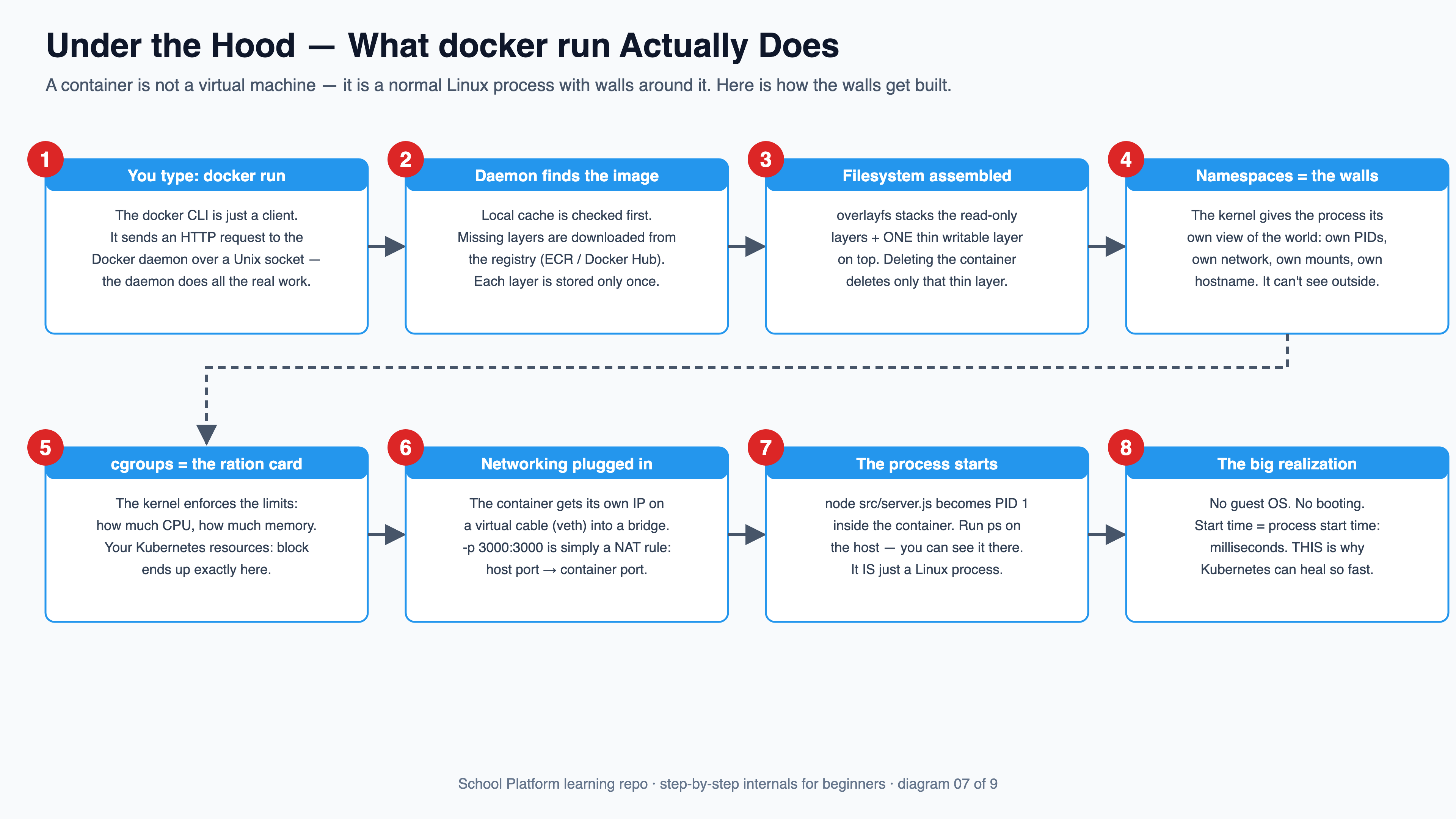
docker run really does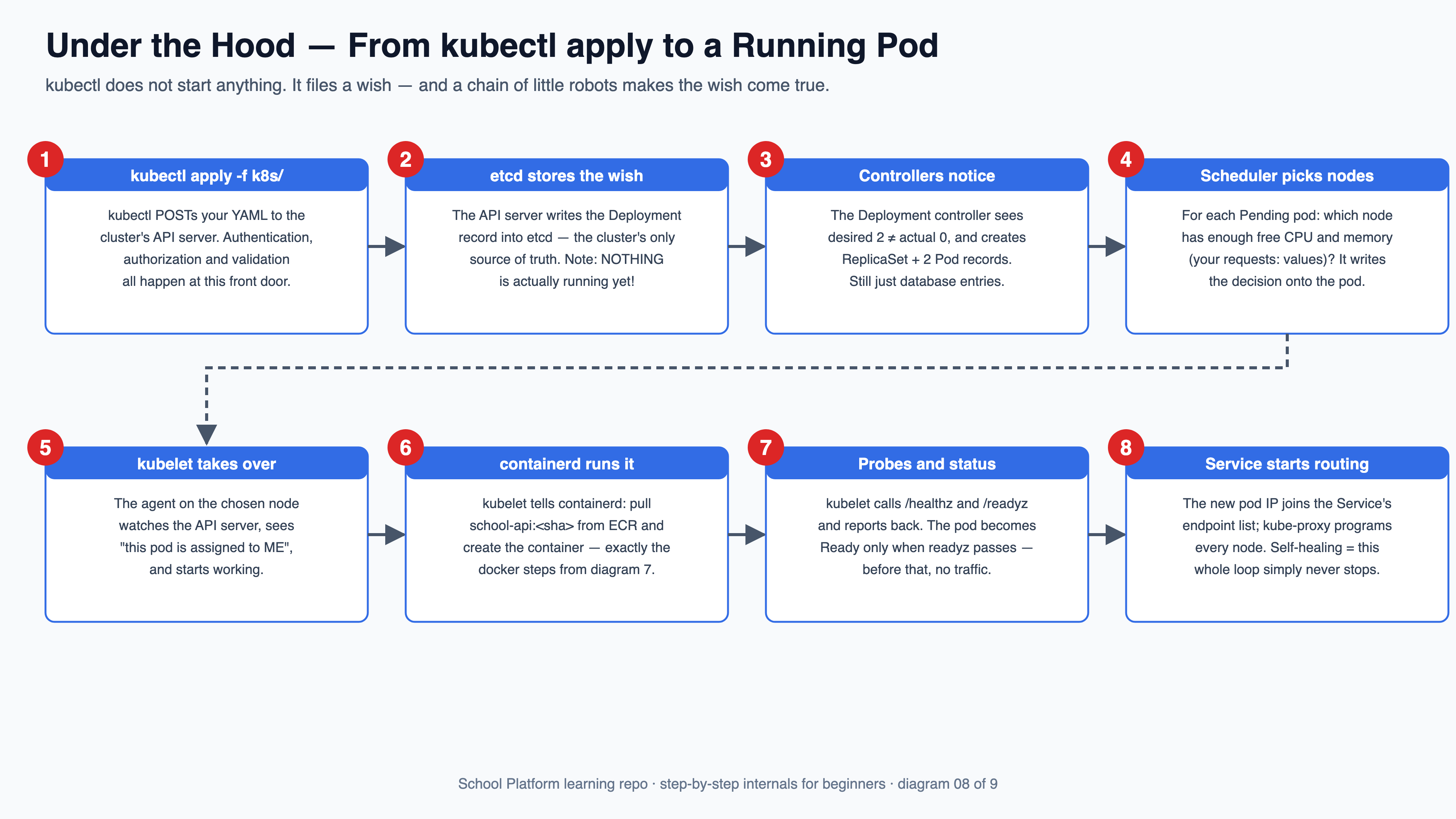
kubectl apply becomes a pod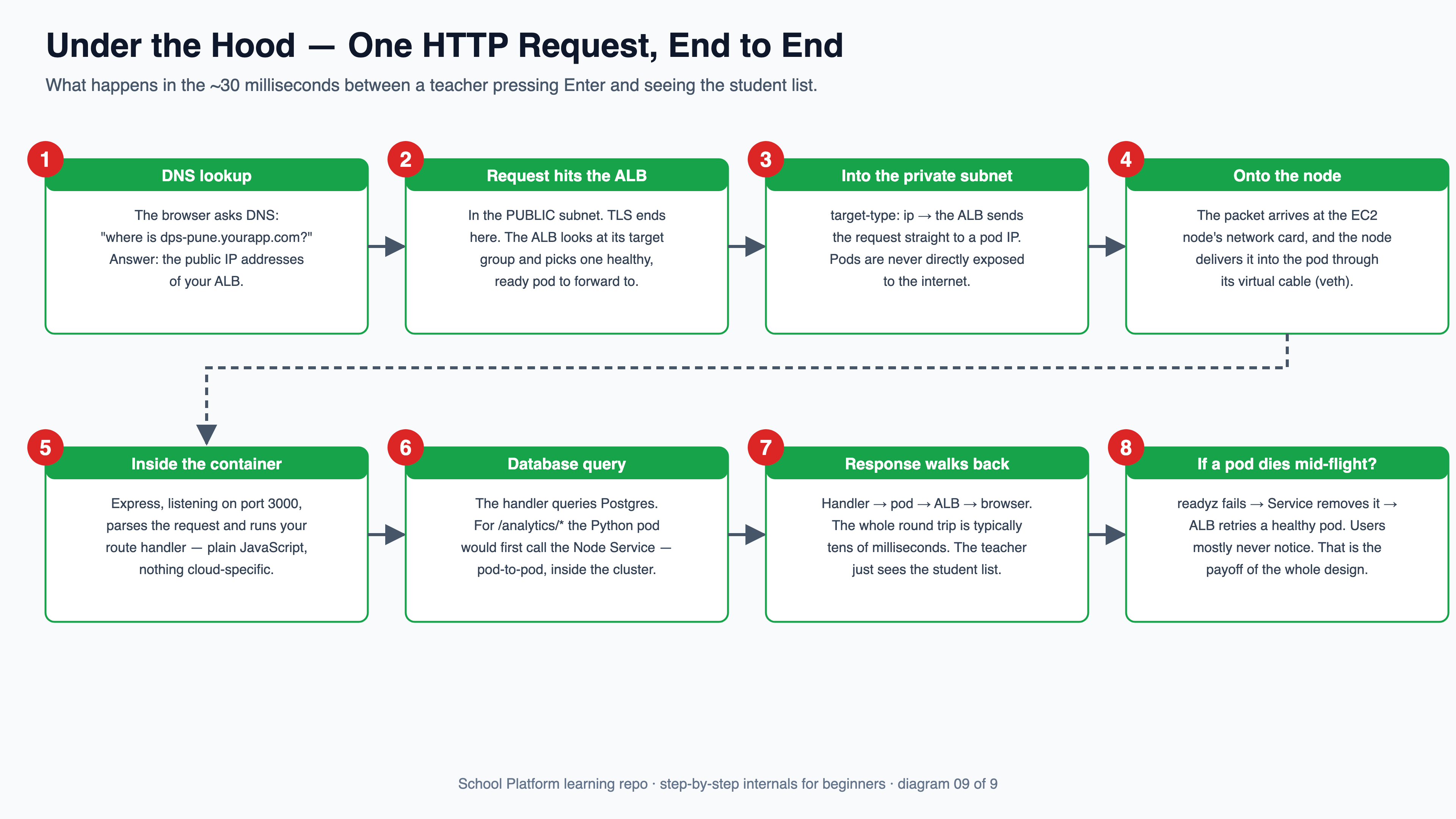
📚 Go deeper
- Production design doc — multi-tenancy for 100 schools, single-domain routing, backups & DR runbook, security checklists (English + मराठी toggle)
- 🎬 Narrated video walkthrough (6 min, 4K) — a guided tour through every numbered diagram
- under-the-hood.md — what really happens beneath
docker run,kubectl apply, and one HTTP request - local-setup.md — run everything on your machine in 3 levels, zero AWS cost
- Main README — the whole story in one page, with the setup checklists
- 🪪 Course 0: Learn AWS School — the foundations: IAM (who may do what) & EC2 (the desks EKS nodes really are)
- 🍱 Course 1: Learn Docker School — 12 lessons on packing & shipping: images, layers, compose, multi-stage builds, registries & AWS ECR
- 🤖 Course 3: Learn ArgoCD School — 12 lessons on deployment: without ArgoCD (by hand, CI/CD push) vs with ArgoCD (GitOps pull)
📐 The lesson diagrams — follow the numbers
Every lesson as one numbered box-and-arrow diagram, one after another — readable right here. Also on a standalone page with jump navigation.
1 🍱 Containers & images — recipe → lunchbox → lunch
One recipe (Dockerfile) bakes one frozen lunchbox (image); every opened box (container) is identical.
2 🪑 Pods — one desk, one address, replace don't repair
Kubernetes never runs a bare container — it always sits at a desk (Pod) with its own IP and shared shelf.
3 🧑🏫 Deployments — declare a wish, the monitor enforces it forever
You say "always 2"; the ReplicaSet counts non-stop and replaces anything that dies.
4 ☎️ Services — one number that never changes
Pods get new IPs all the time; callers dial the Service name and it forwards to whoever is present.
5 🚪 Namespaces — classrooms inside one building
One shared cluster, partitioned into rooms — names only need to be unique inside a room.
6 🔑 ConfigMaps & Secrets — settings live outside the lunchbox
Same image everywhere; the notice board (config) and locker key (secret) are injected at start-up.
7 🙋 Health probes — two questions, two very different consequences
Liveness failure restarts the container; readiness failure only pauses its traffic.
8 🍛 Requests & limits — promised plates and capped seconds
Requests are reservations the scheduler counts; limits are hard caps with different penalties for CPU vs memory.
9 🚌 Autoscaling — the transport manager watches the buses
Above 70% average CPU it adds pods (max 5); when quiet it parks them (never below 2).
10 🏫 Ingress — one gate, routed by the signboard
One load balancer for everything; the URL path decides which Service the visitor reaches.
11 ⚽ Rollouts — substitute one player at a time, keep the bench
A full team is always on the field; the old version stays benched for instant rollback.
12 📚 Storage — backpacks vanish, library shelves survive
A PVC gives disposable pods a durable shelf; this repo goes one further and rents the library (RDS).
13 🏢 Under the hood — what kubectl apply really does
Five office roles, one register, one endless loop: wish → record → reconcile → run → report.
14 🤖 Bonus: CI/CD & GitOps — the homework robot and the caretaker robot
CI tests & builds on every push; ArgoCD lives inside the cluster and keeps it matching the plan book (git).
15 🏫🏫 Bonus: Multi-AZ & the scaling ladder
Never seat the whole class in one building — and climb the cheapest rung first on exam day.
16 🩺 Debugging — the nurse's triage chart
Whatever walks in: describe first, Events always, logs --previous for crash loops.
17 🪪 RBAC — hall passes
Roles are passes, bindings hand them over, ServiceAccounts are the robots' cards.
18 ⏰ Jobs & CronJobs — homework and the bell
The bell creates homework; homework creates a kid; the kid finishes and that's the point.
19 🚫📝 NetworkPolicies — passing-notes rules
Default-deny first, then exactly the conversations the app needs.
20 🎫 Taints & affinity — assigned seating
Signs on desks push away; chits permit; wishes attract; anti-affinity separates twins.
21 🧯 DaemonSets — one on every floor
No replica count: the node list IS the count. New desk, new extinguisher, automatically.
22 🏷️ StatefulSets — desks with name plates
Sticky name, sticky drawer, ordered arrival — the whole difference from a Deployment.
23 🍽️ QoS & evictions — who leaves first
BestEffort, then over-promise Burstable, then Guaranteed — your requests ARE your ranking.
24 🏗️ Cluster upgrades — renovating while open
Office first, then desk by desk: cordon, drain (PDBs on guard), replace, uncordon.
25 🤖 CRDs & operators — new words for the office
A word in the register plus a robot who makes it true — ArgoCD demystified.
26 📈 Observability — eyes on everything
Report cards (metrics), diaries (logs), alarm bells (alerts) — and one screen for all of it.